


Md. Nobiul
Participant
March 22, 2019
Answered

Using Other Microsoft Voices in Captivate

  • March 22, 2019
  • 2 replies
  • 1631 views

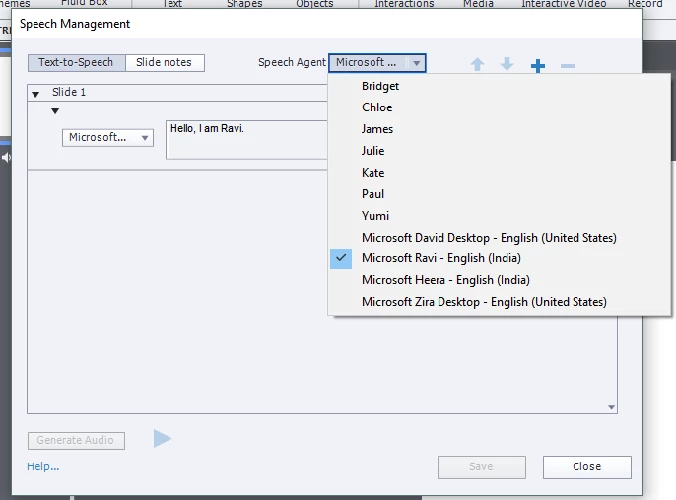
I have installed a new Microsoft voice in my machine and registered to use it with other applications. For Captivate, the voice agent is available in the Speech agent list. The issue is, though I am selecting the new MS voice agent, the voice is not changing.

i.e Its using Microsoft David as default voice though I am changing the agent to MS Ravi.
Now my questions:

1) Why the voice agent's voice is not changing?

2) Do I need to install or register the MS Voice agent in different place?

3) The new voice agent is working with other Text-to-Speech application but not working with Captivate  - any reason?

3) How can I use other Microsoft voice agent in Captivate?

I am using captivate 2019. Thank you in advance for your support.

Regards,

Nobiul Ahasan

This topic has been closed for replies.
Correct answer Md. Nobiul

Well I have no other suggestions.  Might be time to ring up Adobe Support and get them to earn their money for a change.


Resolved it! There are several registry files with same name. Need to check inside of the file to identify right kind of reg content to modify and replace.

2 replies

Emily_Serenity
Participating Frequently
March 28, 2019

It helps if you already have audio set up to click into each of the captions and make a minor change- usually I add punctuation, so that the system thinks you're changing the content. It'll also work if you delete everything and start it again. 

As mentioned by RodWard it's doing the voice for each line, so you can set it at the top to have all new lines generated with that voice, but if you want to change it, you have to go through line by line. 

RodWard
Community Expert
Community Expert
March 22, 2019

Captivate allows you to have different voices on different lines in the script.

So you need to change the voice via the dropdown on that line in the dialog that you show in your screenshot.  What you have set in the dropdown at the top of the dialog is just the default voice. 

Md. Nobiul
Participant
March 23, 2019

Hi, Thank you for your reply.

I have changed the Voice agent of that line as well but having same result. 

Regards

RodWard
Community Expert
Community Expert
March 23, 2019

Delete the slide and try again.  If that doesn't work, reset your Preferences.