
Using smart shapes instead of capture captions or designing custom capture caption
Hi,
I am trying to have custom callouts for the capture captions when recording a software simulation. I've read multiple posts and watched videos on ways to do that. However, I am running into issues with each of the two options I found:
Option 1: Create custom caption

I created 5 different custom captions with the "triangle" pointing in all four directions. Basically it's just a plain "flat" rectangle callout, solid color, no stroke. I saved it as bmp, but I know I also need to create an fcm file. However, I can't find anywhere, when I google, how to convert the bmp into a fcm. So that's my road block for option 1.
Option 2: Use smart shape instead of captions
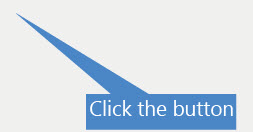
This worked, however the callout smart shape makes various sized "triangles", some of them very long and pointy. To make it look all the same, I would have to adjust it manually on each side. That's not a good solution either. Then I thought to just use the rectangle shape instead of a callout shape to get around the "triangle" issue. However, I can only change the shape if I right click on it and then select "replace smart shape". The properties panel only gives me the option to choose between four different callout shapes, but not a simple rectangle. So I am unable to save the style in order to apply it to all other "caption"-smart shapes. It means I would have to go through each slide one by one to change the smart shape by right clicking.
Is there something else that I am missing? Any other ideas how I could solve this problem?
I am using Captivate 9.0.2.437.
Thanks a lot in advance!


 AdChoices