Inspiring
July 5, 2017
Answered

Validate if One TEB = A different TEB

  • July 5, 2017
  • 1 reply
  • 836 views

Hey Everyone,

So I've been using Captivate 9 for a couple of weeks now, mostly doing software simulation work. However, it's gotten time to add some integration of user input into my work and it's very confusing to me.

What I am trying to do is have one slide that asks the users name. In another slide, they must enter their name again in order to continue to the next slide. So:

SLIDE 1:

Enter your name: [TEB2]

SLIDE 2:

What was your name? [TEB8]

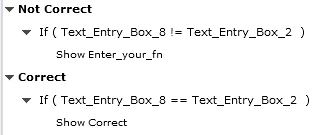
The following is how I have my advanced action set up, but it doesn't do anything at all. Both of my "Enter your First Name" and "Correct!" menus are hidden. The project just keeps going. Where am I going wrong?
This topic has been closed for replies.
Correct answer Lilybiri

I am not sure why, but my other post is being moderated. Currently, I am testing something and it is not working. Here is what I am trying:

Slide one:

What is your first name?: [v_firstName]

Slide two:

Enter your first name: [v_checkName]

[ss_correct] [ss_incorrect]

Both ss_correct and ss_incorrect are hidden.

Neither the incorrect or the correct SS are showing up. Any ideas?

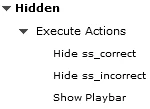
EDIT: I made both of my SS viewable upon entry of the slide and used this:

To hide them and they will not hide. I'm not sure how this normally works, but this is very confusing. I work with logical statements and coding in my regular job use, but I have never had so much trouble with basic commands and statements.


Which event do you use to trigger that action? It should be the Success event of the non-validated TEB for the name on the second slide, the one that is associated with the user variable v_checkName.

How did you hide the two objects (you could have grouped them, Hide Group will then be sufficient On Enter for the slide). I think that is what you meant by the second action 'Hidden'. An advanced action will keep the playhead paused, you have to add Continue as third command (no idea why you show the playbar).

All answers are moderated (I'm one of the moderators, we need to approve or reject each answer and question). It is very strange because I didn't get a mail when you posted this answer and it has been approved.

1 reply

Lilybiri
Legend
July 5, 2017

First recommendation, please do not use the generic names, they can be very confusing and lead to errors. Have a look at this very old blog post:

Strings, Text Entry Boxes and Associated Variables - Captivate blog

I am even very puzzled by those generic names. Do you have one and only one TEB on each slide? In that case I understand that the associated variable is labeled 'Text_Entry_Box_1' on the first slide and  'Text_Entry_Box_8' on the 8 th slide. If you only have two TEB's in the course, one on the first and one on the eight slide, the second variable would have been 'Text_Entry_Box_2'. Personally I don't like that the generic name for the variable is the same as for the TEB, because that leads also to confusion, since the general rule in Captivate is never to use the same name for two items, same type or not doesn't matter. I will label the variables v_firstName and v_checkName.

You talk about two 'menus', but I suppose you mean two text containers with the text "Correct" and "Enter your First Name"? I will label them SS_Correct and SS_Wrong (I'm using Smart shapes as text containers).  If you mean something different, please explain. They should both be invisible when entering the slide, which can be done either with Hide commands in an action triggered On Enter of the slide, of (if the learner will visit that slide only once) by hiding them with the Eye button in the Properties panel: 1-2-3 Eye Buttons Mystery - Captivate blog

You need only one decision in the the conditional advanced action, not two. BUT, you didn't specify which event is triggering that action? If the TEB on the last slides is setup with Multiple Attempts, and is not validated, you only have the Success event to trigger that conditional action. Is that the case?

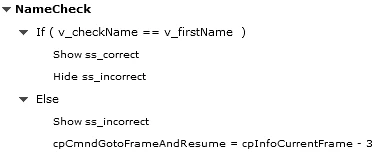
The conditional action (1 decision) could look like this:

You may be puzzled by the last command in the ELSE statement. When you have clicked the Submit button for a TEB, it is no longer active because you'll be in the inactive part of the TEB. By rewinding the playhead three frames back, the playhead is again in the active part and the user can edit or retype the name.

heintzt96Author
Inspiring
July 6, 2017

Thanks so much for your help, Lilybiri! I really, truly appreciate it. I did not realize that I could change the names of the variables so easily! Ultimately what my goal to do is ask them:

Everything in brackets is a TEB.

SLIDE ONE:

What is your name [FNAME]

What is your initial? [EI]

What is your number? [QB]

What is your location? [LOC]

Later in the project, I need a slide that looks like this:

SLIDE TWO:

Enter your name : [2FNAME]

Enter your Initial: [2EI]

Enter your number: [2QB]

Enter your location: [2LOC]

What I need is validation where if [F2NAME] is not equal to [FNAME] then display an "incorrect" shape AND do not allow the user to continue forward. Repeat this for [2EI] with [EI], [2QB] with [QB] and [2LOC] with [LOC].

I'm not sure if that makes sense or not, but I will for sure play around with the information you have given me!

Lilybiri
Legend
July 6, 2017

You could hide the other TEB's and show them on condition that the name has been entered correctly.

Alternative: disable the other TEB's and enable them when the name has been entered correctly.