


Inspiring
May 27, 2021
Answered

Variable for runtime

  • May 27, 2021
  • 1 reply
  • 509 views

Hi,
I need to add the runtime on the screen to help other correct the build.

The TOC doesn´t show it although it should. CP 2019 all updates
So what variable can I use (any that shows progress is fine, time or frames whatever)?
 

    This topic has been closed for replies.
    Correct answer Lilybiri

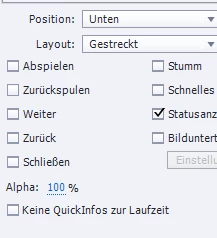
    Not sure to understand. You show the options for the playbar, not for the TOC. On the playbar the progressbar shows sort of progress. I have a couple of blogs which may be an alternative, which I wrote because in a non-linear project the progress bar on the playbar is more confusing than useful. 

    http://blog.lilybiri.com/percentage-progress-indicator-non-linear-course-solution-1

    http://blog.lilybiri.com/percentage-progress-indicator-non-linear-course-solution-2


    You want a system variable? You could use cpInfoCurrentFrame, combined with cpInfoFrameCount.


    1 reply

    Lilybiri
    LilybiriCorrect answer
    Legend
    May 27, 2021

    Not sure to understand. You show the options for the playbar, not for the TOC. On the playbar the progressbar shows sort of progress. I have a couple of blogs which may be an alternative, which I wrote because in a non-linear project the progress bar on the playbar is more confusing than useful. 

    http://blog.lilybiri.com/percentage-progress-indicator-non-linear-course-solution-1

    http://blog.lilybiri.com/percentage-progress-indicator-non-linear-course-solution-2


    You want a system variable? You could use cpInfoCurrentFrame, combined with cpInfoFrameCount.


    Inspiring
    May 27, 2021

    Thanks a lot! That did the trick!

    I just put it on the screen to be deleted once the check has been done.

    Lilybiri
    Legend
    May 27, 2021

    Is it possible to mark the answer as correct for future users?
