
mikedashg
Inspiring
May 19, 2018
Answered

Variables not being set by advanced action

  • May 19, 2018
  • 2 replies
  • 1160 views

I've done this many times on many different files in the past, but for some reason it's not working right now.

I create an advanced action that runs on the "On Enter" for every page, that does several things, changing an object state, and either incrementing a variable, or assigning it. I've tried both ways, either way usually works just fine. This time however both ways aren't working.

At the end I've got another conditional action that checks those variables, and a text caption that displays them. This variable is for making sure they visited the page. All of my variables for every single page aren't being set or incremented in two out of the three of my files I'm working on. They are still set to zero (their default value).

I'm running the latest Captivate 2017 with the latest update. It does this in preview, and fully published/placed on an LMS.

Screen shot, displaying one of the page variables via a text caption within Captivate at the end of the project:


Screen shot, published/preview, even after running the action at the bottom on the first page:

The variable:
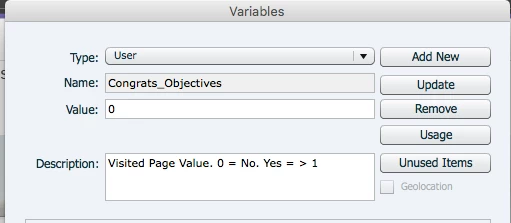
Screen shot, the action I'm using to assign the variable. For what it's worth, the "Change State" on my smart shape does work, the assign variable does not.
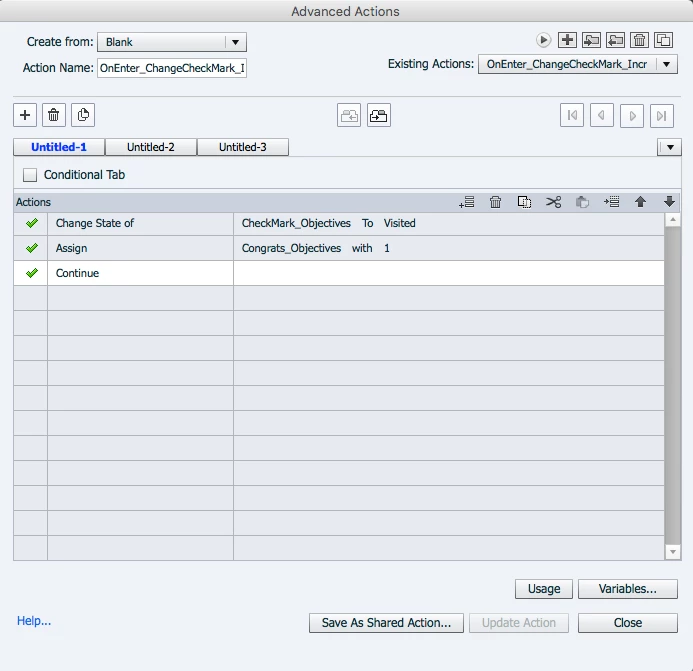
The only thing I can think of is that the project is corrupt, but copy/pasting the slides into a new project is out of the question right now and defeats the purpose.

This topic has been closed for replies.
Correct answer Lilybiri

Here's the advanced interaction panel contents:

https://www.dropbox.com/s/zvk65entleprjf4/MG_AdvancedInteractionPanel.pdf?dl=0

I'm not sure what you mean by "defining the literal as a parameter, or toggling between boolean to 1."

I initially used "increment" and that's how all my other files work. Literarily like 20 other files I've done this thing before, and they work fine. However two of my files don't work for some reason. So I changed it to "assign" the value of 1 thinking that might help. That also didn't work. That's why I wrote in my initial post "either incrementing a variable, or assigning it" but I didn't want to have to get into the detail above, the post was already long enough, heh.

Good tip on not using "Visited" as a custom state. Probably won't use that in the future. Unfortunately that part of the action is actually working, and I've got it setup this way another file where it's working just fine too.


Sorry, I don't have access to your dropbox document

It is clear that the Shared action is not functional. It looks to me that you don't understand the difference between the 'compulsory' parameters and the 'candidate' parameters in a shared action.  Both for the shared action which uses Incrementing as for the shared action using the Assign command (did you trigger the correct SA?) there is NO reason whatsoever to define the literal '1' as parameter, since it has never to be changed in any instance of the shared action. May I point to an article:

http://blog.lilybiri.com/parameters-in-shared-actions-captivate-7-vs-8

You can also watch this interactive tutorial, which is a converted version of my webinar about Shared actions:

http://www.lilybiri.com/published/SharedActions/index.html

Try to recreate the shared action without defining the literal as parameter, eventually in a small new project, and check if the action is indeed toggling the variables to 1 with the Assign action. I am preparing a last post in a sequence explaining Forcing view/Playing Audio once where I will convert the advanced actions to one hared action, including the reflection about which 'candidate' parameters to convert to real parameters and which ones not to convert.

2 replies

Lilybiri
Legend
May 19, 2018

The whole workflow is not clear to me, especially which events are triggering the actions. Can you post a screenshot of (part of) the Advanced Interaction panel (F9)?

The Visited state is an inBuilt state for interactive objects. Is CheckMark_Objectives an interactive object? No need to change the state i that case, but you have to check the option 'Retain state on revisit...'

The labeling system you are using: are you sure not to use the same name for different items? I'm used to identify the type of item in the name, which is not the case here (v_  will be a variable, bt_ will be a button).

mikedashg
mikedashgAuthor
Inspiring
May 19, 2018

Lilybiri, thanks for your reply. To answer your questions, the event that is triggering the actions is the "On Enter" for each page:

This is the advance interaction panel for that action:

Although the rest of the triggers I'm using on every page as a shared action since the interaction is the same for all, and I used the above advanced action as the basis for the shared action:

CheckMark_Objectives is not an interactive object, it's just an image of a check mark on the home page, and it does have retain state on. I'm using the term "Visited" as a custom state to refer to the fact that said page has been visited. The check mark images are all on the home page, showing that that page in the module has been visited. Not that it's a clickable button with a visited state. I could see how that could be confusing not knowing the project. In any event, that part of the action is working. The check mark images get their states changed just fine.

I am sure I'm not using the same name for different items. I use "btn" generally for buttons when I've got a lot going on. I just know they are variables based on the name. Congrats_NAME are all variables related to a congratulations page that shows up at the end:

As are other variable names, where I'm using them to show feedback:

Therefor, CheckMark_NAME are all images.

Lilybiri
Legend
May 19, 2018

I don't see the Advanced Interaction panel. Especially to track if you are not using the same label more than once.

Some possibile causes for your problem: why do you define the literal as a parameter? AFAIK you only toggle that Boolean to 1, no need to define it as parameter in the Shared Action. You didn't use an Increment command at all.

Second remark: Visited is the label of an InBuilt state for interactive objects, I would be careful and not use that lalbel as a name for a custom state for a non-interactive object.

RodWard
Community Expert
Community Expert
May 19, 2018

Have you tried inserting text captions on the first slide of the project and set timing to Rest of Project and inserting your variables in those captions so that you can see what the current value of each variable is at any time?

This is what I do when I am debugging something like this.

mikedashg
mikedashgAuthor
Inspiring
May 19, 2018

RodWard, I went ahead and tried that, and indeed the variables are still zero (their default) through out the entire project. Even though every page is supposed to change them with 1. That's a great tip though, and nice to see it all way through without having to get to the end.