April 16, 2014
Question

Vertical answer-option #2 misalignment on Captivate 7 question slide

  • April 16, 2014
  • 1 reply
  • 318 views

Hi,

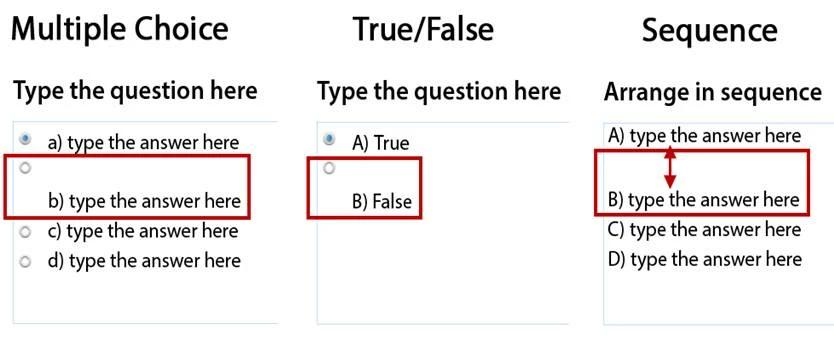
I have an issue when inserting a Question slide in Captivate 7 (but not 6). The problem has to do with the second answer-option on formats such as “Multiple Choices”, “True/False” and “Sequence”.

As illustrated below, the text of option #2 is vertically completely misaligned with its radio button or numbering, while the alignment of #1, #3 and following text options are OK. Changing the font has no effect, and there is no way to “force” the alignment of #2.

Can this problem be overcome or is a bug that was left (amazingly) unresolved?

Thanks
    This topic has been closed for replies.

    1 reply

    Lilybiri
    Legend
    April 16, 2014

    Try this: in Preferences, Defaults, uncheck 'AutoSize Captions'.

    April 16, 2014

    Bingo! Thanks very much.

    While we're at it, I also have an issue with the Fill-In-The -Blank question slide. It first appears with the text "Type the blank phrase". If I replace "Type the" by a longer text (using cut&paste via Notepad), then placing the cursor over the "blank" does not trigger the display of the corresponding dialog box: to do so, I must place the cursor 2-3 words further on the left. Any clue?

    Lilybiri
    Legend
    April 16, 2014

    FIB has a lot of issues, I will rarely use it myself (replacing it by a custom question slide). But also try to avoid copy/paste when possible, never been a lover of the windows clipboard - has caused me too much troubles...

    Lilybiri