



Chelz.101
Participating Frequently
April 8, 2021
Answered

Video Background on a Captivate Slide

  • April 8, 2021
  • 3 replies
  • 623 views

Hi,


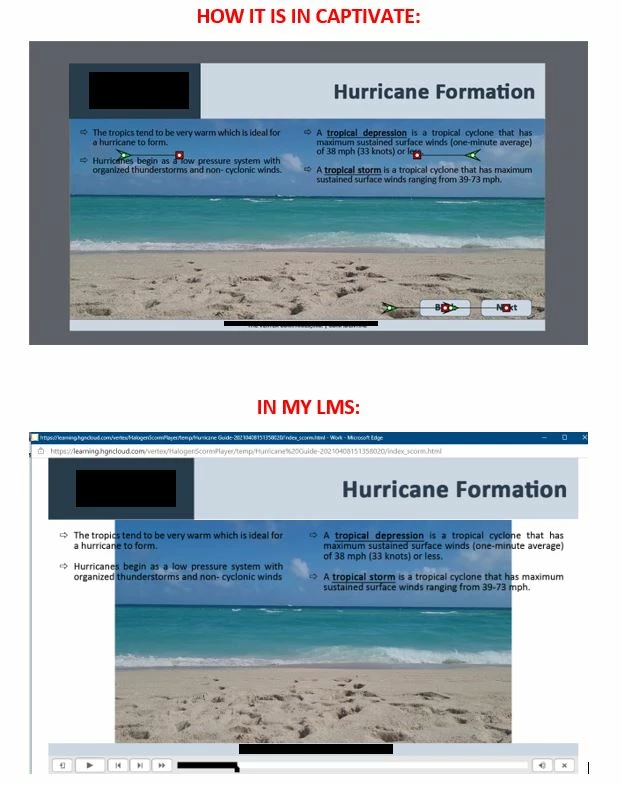
I am trying to have a video as a background on a slide in my project. When I import the video, I adjust the size of it to the slide (1280 by 540). I removed the skin and set the video to auto rewind and loop. I added to text boxes to slide that sit on top of the video.


When I preview the slide in Captivate, it works perfectly. However, when I publish the file and upload to my LMS (SABA TalentSpace), the video is not the same size. 


What am I doing wrong? Is there a setting I am overlooking? Could it be the LMS? 


The video is an mp4. Does the video need to be another format?


This topic is closed to new replies. Start a new post to keep the conversation going.
Correct answer Lilybiri

You could re-encode the video with Adobe Media Encoder. MP4 is a common label for multiple codecs. Set it to the size you need it in Captivate in that encoder.

Play slide is NOT a Preview method. How does it look with F11, Preview HTML in Browser? 

3 replies

Lilybiri
LilybiriCorrect answer
Legend
April 8, 2021

You could re-encode the video with Adobe Media Encoder. MP4 is a common label for multiple codecs. Set it to the size you need it in Captivate in that encoder.

Play slide is NOT a Preview method. How does it look with F11, Preview HTML in Browser? 

Chelz.101
Chelz.101Author
Participating Frequently
April 8, 2021

THANK YOU! That worked!! I'm learning Adobe Media Encoder so I was not aware of the capabilities! Again, THANK YOU!!


As for preview, I normally preview with F8 but I think F11 will be my go to going forward!

Lilybiri
Legend
April 9, 2021

Reason is that in a non-responsive project all Preview methods except F11 use a temporary SWF output, which is now obsolete. Only F11 shows you HTML output which needs a browser.
