
Daniel Gimness
Inspiring
August 9, 2016
Answered

Video not publishing in Captivate 9

  • August 9, 2016
  • 1 reply
  • 1196 views

Hi,

I'm using Adobe Captivate 9 and have an issue with video that's inserted into the course, not being published and the course hangs on publishing and doesn't publish.

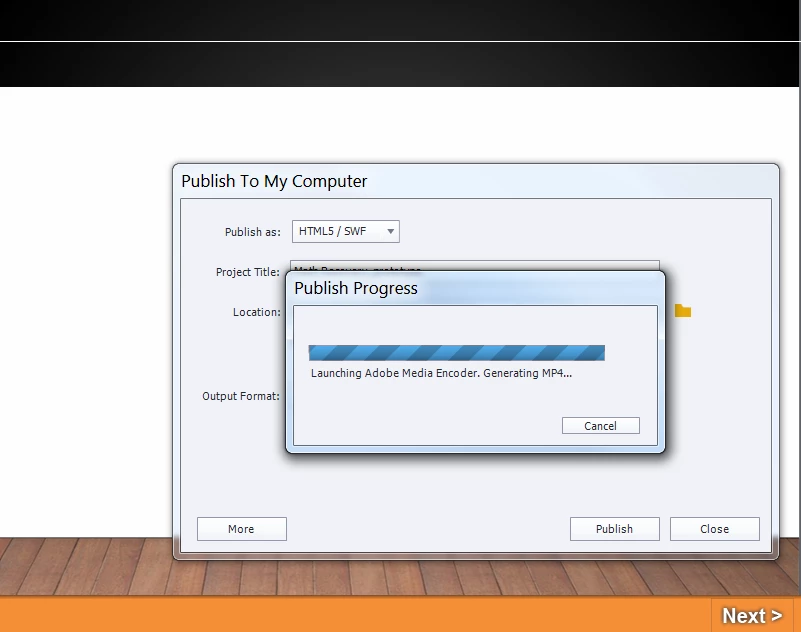
The video plays fine in Captivate preview, though for some reason Captivate doesn't want to publish out the video when publishing out to HTML5. See screenshot below when I go to publish. Adobe Media Encoder opens, video is processed and then nothing happens.

Solution?
This topic has been closed for replies.
Correct answer RodWard

Take the video file and process it through the Adobe Media Encoder (AME) app with settings to make an MP4, BEFORE inserting it into the Captivate project.  If Captivate is triggering the AME app when publishing it must believe there is something wrong with the video file that reprocessing it will fix.

Make sure that the settings in AME add all necessary metadata to the video output file (not all MP4's have the correct data).

Then see if you get better results when publishing out.  If not, try just inserting the AME published MP4 into a new blank Captivate project with just one or two slides and see if that will publish.  If it does, then you may have another issue somewhere in your current project.

1 reply

RodWard
Community Expert
RodWardCommunity ExpertCorrect answer
Community Expert
August 13, 2016

Take the video file and process it through the Adobe Media Encoder (AME) app with settings to make an MP4, BEFORE inserting it into the Captivate project.  If Captivate is triggering the AME app when publishing it must believe there is something wrong with the video file that reprocessing it will fix.

Make sure that the settings in AME add all necessary metadata to the video output file (not all MP4's have the correct data).

Then see if you get better results when publishing out.  If not, try just inserting the AME published MP4 into a new blank Captivate project with just one or two slides and see if that will publish.  If it does, then you may have another issue somewhere in your current project.

Daniel Gimness
Inspiring
August 13, 2016

Thanks Rod!