Answered
Video Preview Windows
Captivate 7.
Re: http://helpx.adobe.com/captivate/using/record-video-demonstrations.html#edit_videos
How do I get this Video Preview Window to open so that I can explore editing a Video Demo?
Captivate 7.
Re: http://helpx.adobe.com/captivate/using/record-video-demonstrations.html#edit_videos
How do I get this Video Preview Window to open so that I can explore editing a Video Demo?
So you are using the second option Insert, Recording Slide, Video Demo? Can you confirm? And is the timeline of the slide having a red line in the center?
Or maybe, could you post a screenshot of the timeline?
If this is the case, select that slide and look in the Properties panel, use button 'Edit Video Demo'
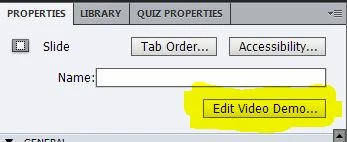
Lilybiri
PS: in this case the video will be previewed if you use one of the preview modes, even playing the slide with the control buttons in the Timeline panel.
Already have an account? Login
Enter your E-mail address. We'll send you an e-mail with instructions to reset your password.
 AdChoices