Known Participant
June 13, 2013
Question

Viewing Properties - Character Section - Can't see right arrow to view all fonts

  • June 13, 2013
  • 2 replies
  • 658 views

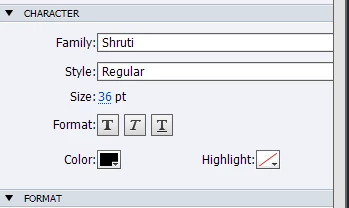
I am using Captivate 6. I have the properties window open, and would like to change the font. I can not see the arrow on the right of the field. It is cut off with the scroll bar.
    This topic has been closed for replies.

    2 replies

    RodWard
    Community Expert
    Community Expert
    June 14, 2013

    Looks like somewhere in your Font collection you have one with and extremely long name.  Is that possible?

    Rosc363Author
    Known Participant
    June 14, 2013

    Thank you RodWard. I think you are onto something. Do you know how I can make a font name smaller?

    RodWard
    Community Expert
    Community Expert
    June 14, 2013

    Well you can try renaming the font, but I've never tried to do this (or needed to). Most fonts have fairly simple names.  But there may be complications if you just try to alter the font filenames.  By all means look in the Windows > Fonts directory.  That's where your fonts are stored.

    Varun Kalra
    Participating Frequently
    June 13, 2013

    Hi there,

    It seems that Properties pane has been dragged towards the right, you can manually drag it towards left.

    Also, You can either reset the present workspace or select any other workspace type - like navigation or widget and then try.

    Please try this.

    Thanks.

    Rosc363Author
    Known Participant
    June 14, 2013

    Thank you Varun Kaira, but this is not it.