

Visited state buttons jump around in mobile breakpoints
I'm using the latest Captivate 2017 with the latest update, using breakpoint responsive mode. This thing happens only after it's been published. Preview mode looks fine. It shows up locally, and on the LMS.
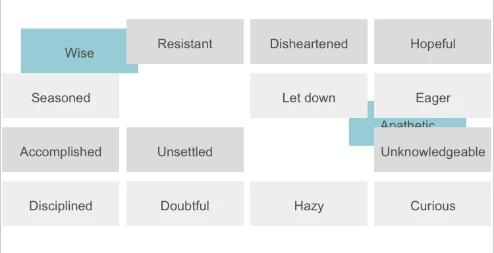
My files were working great for about a month. I had multiple users test it on multiple devices/screens/browsers/etc. Then all of a sudden, my smart shapes (used as buttons) once they've been clicked, and you revisit the page, they are not in the same position anymore.
This is happening on ALL of my files. It's happening to two different people who created completely separate files too. One of the published files I didn't even open or touch. One day the published SCORM files were working just fine posted to an LMS across multiple mobile devices, and the next day it wasn't.
It's fine on the desktop right now after the latest Captivate update (my prior Captivate version was doing it even on the desktop in several places) and re-publishing, it's just mobile breakpoints now that still do it. This happens on the actual devices (both iOS and Android), or even when I resize a browser window on my desktop to the dimensions of a mobile device. Locking the position within Captivate does not work.
Screen shot of the buttons on initial page visit:

When you click on the buttons above, they change color and it looks fine (sorry no screen cap of that).
However, when you go back to the page, it looks like this:


 AdChoices