Participating Frequently
November 7, 2017
Answered

Want to show highlight box over correct answer after 2 attempts

  • November 7, 2017
  • 1 reply
  • 863 views

Good morning, everyone-

I'm working on an unguided simulation assessment. In this assessment, I have a highlight box and click box over the correct answer, but I only want the highlight box to show after 2 attempts.

I have written a script that isn't working (attached) and I'm hoping that someone can tell me how to fix any mistakes. Let me define some of the items first:

Hint_1: highlight box

v_attempt: variable set at 0 initially
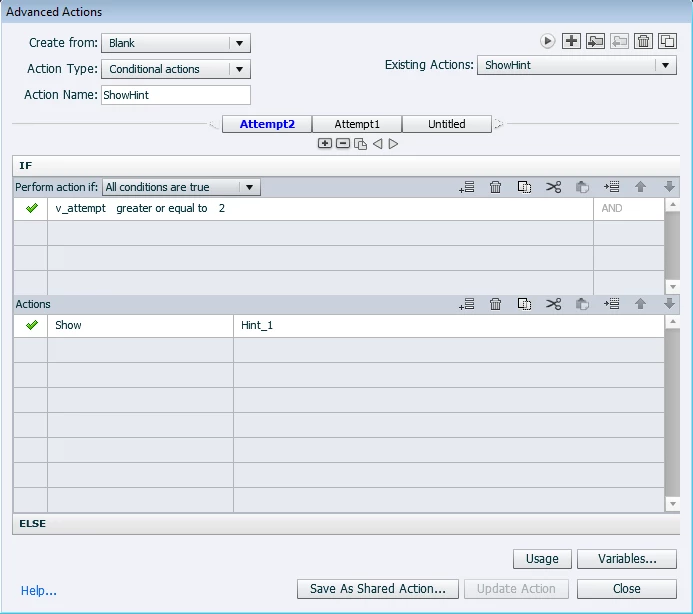
Additionally, the slide is currently set to infinite attempts, but I also tried the same with 3 attempts with no success.

If possible, I would also like to have more than 2 attempts be marked as incorrect. This would mean, when the highlight box appears the user is also wrong.

Any help you be appreciated!

This topic has been closed for replies.
Correct answer Lilybiri

Thank you. I see what you mean about output files. In my experience if it can break on publishing, it will. The fact that it isn't functioning properly on the preview isn't giving me much comfort haha

I also appreciate you offering other solutions. I'm sure that could work, but I'm worried about efficiency since I'm testing this on one part of what is a larger project.

Are there any other solutions/workarounds that you are aware of? I'm flexible when it comes to the solution's requirements or complexity.

Any suggestions would be appreciated. If not, then I'll implement your last solution. Thanks!


Another solution is the scenario 2 which I explained in this blog post:

Replay (slide) Button - Captivate blog

For a larger project that could be a better solution.

1 reply

Lilybiri
Legend
November 7, 2017

You are not on CP2017, which version do you use?

Which event is used to trigger this action? You have a click box over the correct answer, with how many attempts? 

BTW: It is much easier to show the complete action by using the Preview butotn (first button, like an arrow, in the control panel top right).

Participating Frequently
November 7, 2017

Hi, Lilybiri-

Thank you for your response. I'm in Captivate 8. I have the slide set to execute the advance action script on slide entry.

Currently, the click box is set to infinite attempts because I would like the user to select the correct answer before continuing.

-Lauren

Lilybiri
Legend
November 7, 2017

That will not work, that action is only executed when entering the slide, not when you have clicked outside of the click box.

Do you have multiple click boxes on that slide or only one? You need the event when they click outside of the click box. Although you have a Last Attempt event, that will only fire after the last attempt and is unusable. You could try this approacgh:

  • Put a click box covering the whole slide, but it has to be UNDER the click box over the correct aswer. I will label that big one CB_Full
  • Trigger the script you created by the Success event of that CB_Full.