
Gray Susan
Inspiring
May 8, 2017
Question

Warning popup freezing Captivate 9

  • May 8, 2017
  • 1 reply
  • 144 views

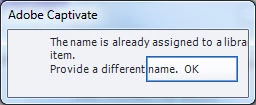
So I'm updating some audio on a project in Captivate 9 and accidently renamed the audio file one I'd already used.  Actually I've done this a couple times and each time Captivate freezes.  It won't accept when I click OK so I end up killing Captivate and going back in.
    This topic has been closed for replies.

    1 reply

    Lilybiri
    Legend
    May 8, 2017

    Never use the same name, I am recommending to everyone all the time to have a very strict labeling discipline. Use a table with naming conventions to avoid getting in this type of problems. It seems to be a loss of time, but that is not the case. It can be worse: sometimes advanced actions just disappear because of having duplicate names.

    Gray Susan
    Inspiring
    May 8, 2017

    It was an accident.  I'd meant for the name to be different.  But once the popup comes up I can't get the OK button to work so I can go change it.  Believe me I've been preaching what you've taught me about naming stuff in projects.  Of course the men I work with fail to listen. Susan Wright (Equilady) Remember, the mighty oak was just a nut that held its ground. http://www.equilady.com

    From: Lilybiri <forums_noreply@adobe.com>

    To: Susan Wright Davis <smw12aug@yahoo.com>

    Sent: Monday, May 8, 2017 9:00 AM

    Subject: Warning popup freezing Captivate 9

    Warning popup freezing Captivate 9

    created by Lilybiri in Adobe Captivate - View the full discussionNever use the same name, I am recommending to everyone all the time to have a very strict labeling discipline. Use a table with naming conventions to avoid getting in this type of problems. It seems to be a loss of time, but that is not the case. It can be worse: sometimes advanced actions just disappear because of having duplicate names. If the reply above answers your question, please take a moment to mark this answer as correct by visiting: https://forums.adobe.com/message/9501924#9501924 and clicking ‘Correct’ below the answer Replies to this message go to everyone subscribed to this thread, not directly to the person who posted the message. To post a reply, either reply to this email or visit the message page: Please note that the Adobe Forums do not accept email attachments. If you want to embed an image in your message please visit the thread in the forum and click the camera icon: https://forums.adobe.com/message/9501924#9501924 To unsubscribe from this thread, please visit the message page at , click "Following" at the top right, & "Stop Following" Start a new discussion in Adobe Captivate by email or at Adobe Community For more information about maintaining your forum email notifications please go to https://forums.adobe.com/thread/1516624. This email was sent by Adobe Community because you are a registered user.

    You may unsubscribe instantly from Adobe Community, or adjust email frequency in your email preferences

    Lilybiri
    Legend
    May 8, 2017

    Try cleaning the Preferences, but I'm not sure it will help, could be stored in the project file. Did you try to delete that audio file in the Library?