
Inspiring
April 13, 2018
Question

Web object youtube video doesn't appear in preview or publish

  • April 13, 2018
  • 2 replies
  • 904 views

I'm working on a responsive project in Captivate 2017 and having some issues with a web object housing a youtube video URL appearing.

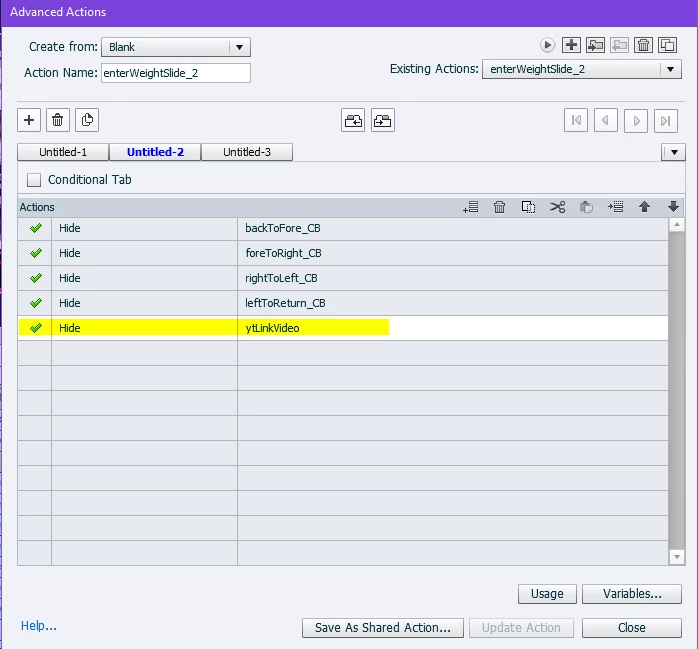
I have the web object set to 'hide' with an on enter action for the slide and then a click box button that has an action to 'show' the web object. However when I click

the click box, the web object does not appear.

I originally had this slide set up the same way with a normal embedded video, but the embedded video is so slow on mobile devices, often times it won't appear at all. I thought maybe using a web object would help 'lighten' the file size and improve playback speeds.

I have a couple of other objects set to 'show' upon clicking my click box as well, and they do appear like they are supposed to - it's only the web object that doesn't show up and it doesn't appear in preview mode or in the published project file.

Any help/advice would be much appreciated.

Here's a screenshot of my clickbox in the timeline and it's advanced action -

And here's a screenshot of my on enter advanced action for the slide -
This topic has been closed for replies.

2 replies

Paul Wilson CTDP
Community Expert
Community Expert
April 14, 2018

YouTube doesn't prevent you from putting their videos into an iframe (web object). A video owner can prevent their videos from being embedded into other websites using this method. Most don't do this however since for most YouTubers it's all about the views. For example, every time you see one of my video tutorials posted here on the eLearning community, it's merely an embedded video. I'm happy for you to watch it wherever you do so.

What you need to do is not use the regular URL of the video, but instead use the embed code. From the video on Youtube click the share option. It defaults to the regular URL but you will see an option for the embed code. There are several options you can select that will change how your video runs. Make those selections and then copy the resulting code.

In the properties of your Captivate web object change it from URL to embed code and paste in the embed code from YouTube. It should work fine.

Keep in mind that if you publish your project to your desktop the video will not be seen as your project needs to be run from a web server in order to see the web object working. Previewing works because Captivate includes a local web server for testing purposes.

Paul Wilson, CTDP
KeelyMAuthor
Inspiring
April 16, 2018

Thanks Paul! I will give this method a try.

I wish simply embedding the video would work - after some further testing I've discovered that the embedded videos do in fact run fine on an Android device, however they do not appear or play on Apple devices. I'm testing in Google Chrome on all devices (Samsung phone, iPhone, and iPad). Is this a known issue with Apple devices?

David Burnham HBA
Inspiring
April 13, 2018

Just for clarification if you use a web object to try and present a youtube video it may not work because a web object uses an iframe which most times You tube will not allow playback in.

You may want to try using the You Tube widget in the Learning Interactions and see if it will support the video playback. I think you may have some success using this approach.