
Participant
February 22, 2020
Question

Webcam is Busy when creating a Video Demo

  • February 22, 2020
  • 4 replies
  • 1007 views

Hi, I have a problem using the Adobe Captivate on my Macbook Pro.

Mac System: macOS Catalina 10.15.3(19D76)

Captivate Version: 2019 Release 11.5.4.613


When I start to creat a video demo, it pops up a problem says the Webcam is Busy, but actually I did't use/open any Apps or Any softwares but Captivate. I attached a picture regard the problem I met. 
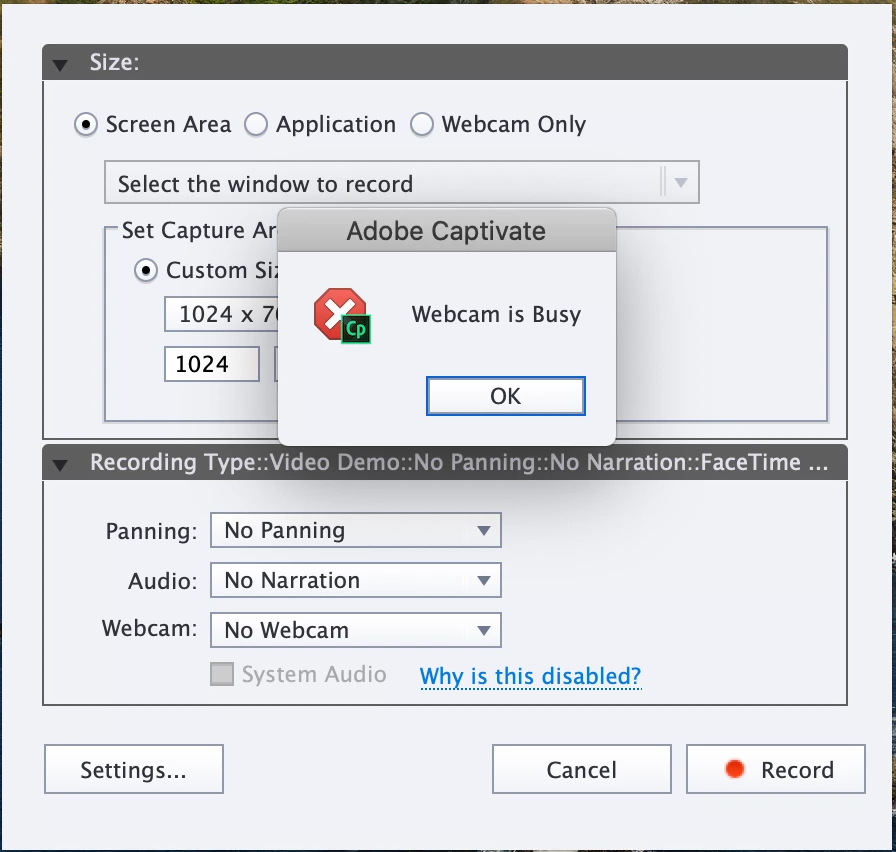
It would be highly appreciated if anybody do knows how to fix this issue.


    This topic has been closed for replies.

    4 replies

    chantalouellet
    Participant
    March 29, 2021

    This is a very annoying problem that has been going on for over a year now for me. I just reinstalled everything, Captivate and my system - Catalina. It still doesn't work. It's driving me crazy, especially since it worked so well before. My camera works with Prezi and other screen capture applications. It's about time Adobe came up with a working version of Captivate. It's deplorable given the cost of the application. And please don't tell me to check if another application is using the camera or to allow Captivate to have assess to it via the "security" and compatiblity through my System Preferences! It's already been done and, for even more precautions for the moment, I suspended the access to all the other apps. So find something else, please!!! 

    RodWard
    Community Expert
    Community Expert
    March 29, 2021

    Please remember that this is a User Forum and not Adobe Support.  The people here are just users like yourselves.  If you want to berate Adobe, get in touch with them directly.  None of us here are responsible for Adobe's shortcomings with Captivate.

     
    multireflex
    Inspiring
    September 26, 2020

    Same problem here, with the embedded webcam in my MacBook Pro... What a crap! New feature that doesn't work???


    Anyone, any help??? hellooo???


    wagilabs
    Participant
    May 29, 2020

    I have the same problem and technical support tried for an hour to fix it. No luck. Any suggestions.

    RodWard
    Community Expert
    Community Expert
    May 30, 2020

    If the webcam is a USB webcam, did you try unplugging and replugging it?


    If it is a webcam on your laptop, you could try removing it in Device Manager and then rebooting your PC again so that the operating system sets up the web cam again plug and play. 


    If it is still blocked, some other app or driver must be taking control of the webcam and preventing Captivate from using it.  If on Windows, type the keyword 'camera' into the search bar at the bottom of your screen to ope the Camera app and see if that is able to use the webcam.

    wagilabs
    Participant
    June 7, 2020

    Thank you. With Adobe technical support we unplugged and re-plugged and still same message. We set up a Guest Accout and no solution. Technical support has now spent 2+ hours and three calls and no solution.

    Participant
    May 1, 2020

    I have the same problem