Answered
Weird Bullet Point problem
I created a bulletted list and got a strange extra space on the second line of text (see graphic). How can I fix this? My bullet item extends to two lines.
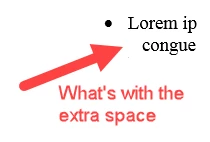

I created a bulletted list and got a strange extra space on the second line of text (see graphic). How can I fix this? My bullet item extends to two lines.
If your text is copied and pasted from MS Word, or MS PowerPoint, you're bringing in hidden characters that will cause these (and other) problems.
When you see this,

just say NO!
As you can see, the default answer is Yes!
Here is an example showing different results between answering Yes and No.

The best practice has been to open text in a simple text processor, like note pad or BBedit, and use that as a source for copy/paste.
As a test, copy your text from Captivate, paste into NotePad and copy it again. Then paste over the Captivate text, with no formatting.
Already have an account? Login
Enter your E-mail address. We'll send you an e-mail with instructions to reset your password.
 AdChoices