

Participant
July 4, 2022
Answered

Weird slide issue

  • July 4, 2022
  • 2 replies
  • 470 views

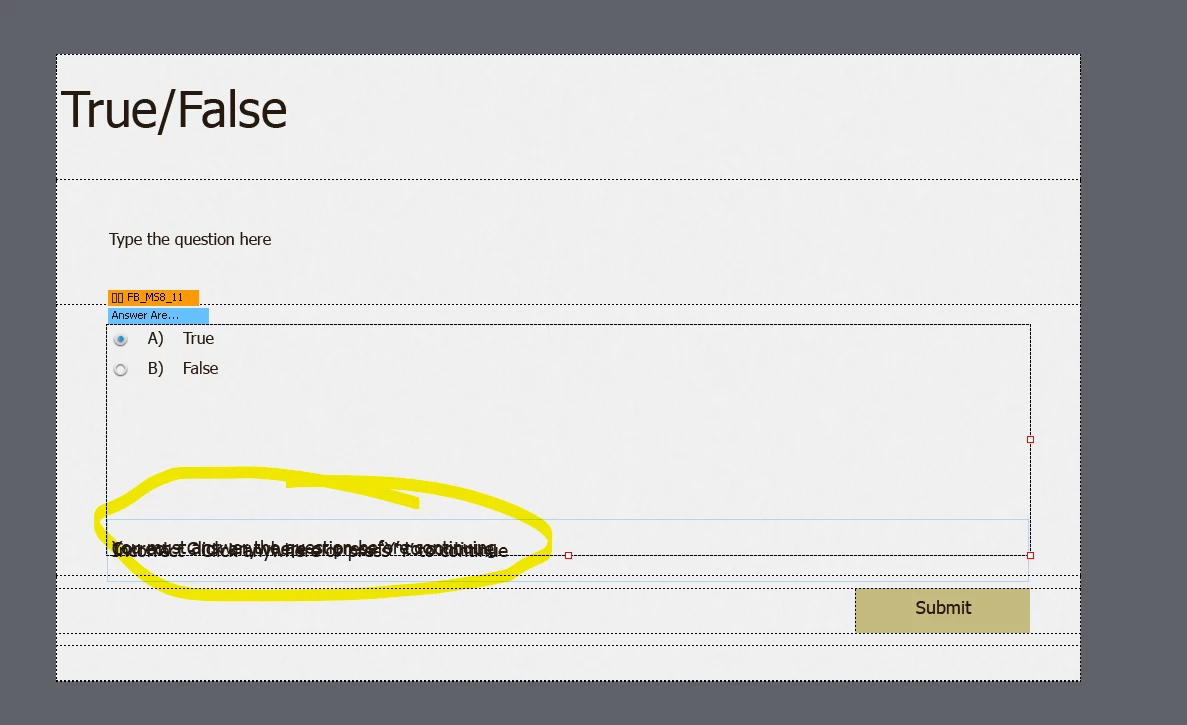
Does anyone else have this problem. When I choose to insert a question slide and use a True/False slide. I get this? I cannot simply make a true/false slide and its a nightmare to sort out the text

    This topic has been closed for replies.
    Correct answer Lilybiri

    It is a fluid boxes project.  I don't know which theme you are using, but someone has messed up the quizzing master slide for T/F, MCQ... slides. Maybe the object styles for Quizzing feedback messages as well.


    Normally the feedback messages are stacked IN a static fluid box, but that box has been resized vertically and the messages seems to be out of that static fluid box (I suspect it is the small one just below your stacked messages. All other fluid boxes are normal. Moreover the object styles for those feedback messages which are normally shapes with a solid background, seem not to have a transparent background, hence you are seeing all messages at once.

    More information about the correct layout for quizzing master slides to be found in one of my older blog posts:

    http://blog.lilybiri.com/tips-for-fluid-quiz-slides

    http://blog.lilybiri.com/quiz-slides-with-fluid-boxes


    2 replies

    Nick HallAuthor
    Participant
    July 4, 2022

    Hiya,

    Thanks for explaining lilybiri. I've managed to unlock from the fluid boxes and amended them for me. I'm still learning Captivate so this was a good challenge in terms of using the fluid boxes.


    Is there a way to reset the slides from the main download themes, so these are corrected? (if that's how it works)


    Lilybiri
    Legend
    July 4, 2022

    Be sure to lock the messages again to the fluid box to maintain the fluidity. During consultancy jobs I so often have to correct messed up master slides and themes.

    Master slides are part of the theme you are using. The themes packaged with Captivate do only have one small bug in 11.5: some of the messages are using the wrong style. Example: Failure message is using the Success style. That can easily be fixed.

    I don't know which themes you are talking about? You cannot save an existing theme after editing, you always have to save as a custom theme. A custom theme for any project is always the start point in my workflow. Use the Theme menu to save, and you don't have to save in the same map as the default themes.You can find a lot of blog posts in my blog about themes. Too many CP users ignore them, not only newbies, and that is a shame. Some of the Quick Start Project in the Assets panel do not have a well-structured theme, just a warning.

    Please, can you mark the answer which helped you as being correct?

    Lilybiri
    LilybiriCorrect answer
    Legend
    July 4, 2022

    It is a fluid boxes project.  I don't know which theme you are using, but someone has messed up the quizzing master slide for T/F, MCQ... slides. Maybe the object styles for Quizzing feedback messages as well.


    Normally the feedback messages are stacked IN a static fluid box, but that box has been resized vertically and the messages seems to be out of that static fluid box (I suspect it is the small one just below your stacked messages. All other fluid boxes are normal. Moreover the object styles for those feedback messages which are normally shapes with a solid background, seem not to have a transparent background, hence you are seeing all messages at once.

    More information about the correct layout for quizzing master slides to be found in one of my older blog posts:

    http://blog.lilybiri.com/tips-for-fluid-quiz-slides

    http://blog.lilybiri.com/quiz-slides-with-fluid-boxes
