
Inspiring
November 11, 2015
Question

What am I doing wrong? (Timing)

  • November 11, 2015
  • 3 replies
  • 300 views

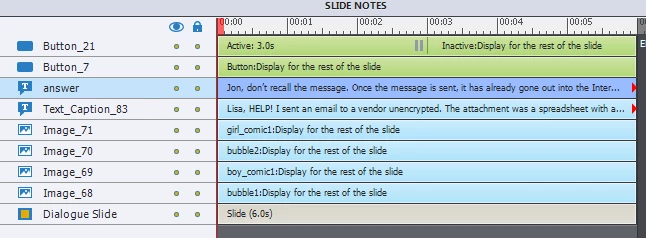
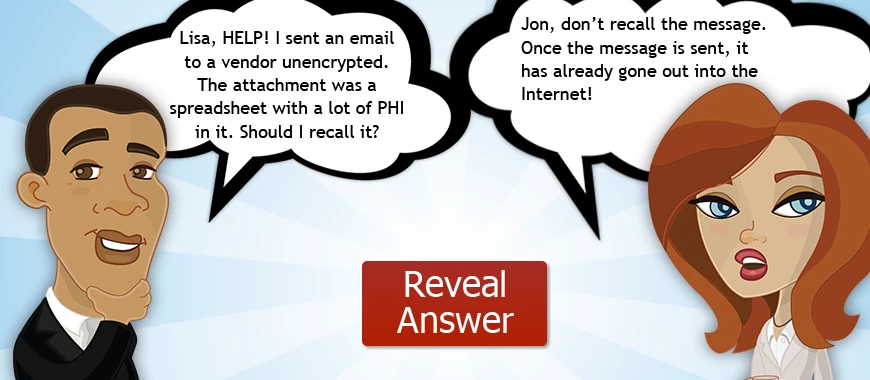
My slide is set up as so... when the slide appears, only the question appears, and the answer is hidden. So after discussion (this is for an instructor led class), I click on the "reveal answer" button and then the answer appears. However, a couple of seconds after the answer appears, the slide moves to the next slides. How can I make it pause after the answer appears? Thanks.
    This topic has been closed for replies.

    3 replies

    Inspiring
    November 13, 2015

    Thanks everyone; it looks like there are several options. It looks like the simplest solution is to uncheck the "Continue Playing the Project" box. That appears to work in my situation - I didn't see it there before. Thanks!

    Lilybiri
    Legend
    November 11, 2015

    Which button is 'Reveal Answer'? As for Rick's answer, in case you are still on CP8 or earlier, have a look at:

    Why choose Standard over Simple action? - Captivate blog

    I updated it for CP9 users, shows a screenshot how to prevent the playhead from moving on after the pause when a simple action is triggered.

    RodWard
    Community Expert
    Community Expert
    November 12, 2015

    Actually I think there need to be two things happen here.

    One is that the Reveal Answer button needs to be set to pause the slide (which it currently seems to be doing) and execute the action to reveal the answer when clicked (which it currently does).

    And then the second thing is that, if it is NOT desired that the slide automatically advance to the next slide X number of seconds after showing the answer, then there either has to be a Click Box or another button set to pause the same slide AFTER the first button so that the user has an explicit way to execute the action to move to the next slide.

    There are several creative ways that you could make this happen. 

    One way would be to Show/Hide buttons using Advanced Actions.  (Hide the Reveal Answer button and Show a Go to Next button)

    Another way is to dynamically change the text in the ShapeButton from Reveal Answer to Go to Next when it is first clicked.  This could be done using Variables and Conditional Advanced Actions or with Object States in Cp9. You would also need to use variables and Conditional Actions to change the button's action from revealing the correct answer to Jump to Next Slide as well.

    Captiv8r
    Legend
    November 11, 2015

    What version of Captivate? If it's version 8 or earlier you need to investigate using Advanced Actions. If it's version 9 you could achieve it using the new States feature.

    Paul Wilson CTDP
    Community Expert
    Community Expert
    November 11, 2015

    Looks like button_7 doesn't have a pause. Why not add one to pause shortly after the reveal answer point on your timeline.

    Paul Wilson, CTDP