
What exactly triggers a checkbox in the ToC (2017)?
Apologies, as this may get a little long, but I am going to try to provide all the critical information to help the community provide a solution.
Problem in a nutshell: As per the title, I am trying to figure out what exactly triggers a checkbox for a section of content in the Captivate 2017 ToC. This is because we have an issue with all the chapters being checked off after being viewed, but the course is not being recognized as having a 'Complete' status on the client's LMS.
The Goal: We would like the user to be required to view all the slides before being allowed to take the exam (a separate file), which requires the course to be marked as Complete per the Completion Criteria.. The export details are below in the Background section.
Worth Noting: If we do everything the same, except we switch the export option to 'User Access' rather than 'Slide Views and/or Quiz', the course is being recognized as having a 'Complete' status on the client's LMS and the exam unlocks and launches.
The key issue is the course not being recognized as 'Complete' when using the 'Slide View' requirement. At the end of the day, this is a situation that comes down to 'who needs to fix the issue for the client', so I need to understand if we are potentially doing something incorrectly, or if there are additional things we need to look into.
My Theory: 1) The check boxes in the ToC are NOT generated by having viewed every single slide in that section, and are therefore unreliable as an indicator that the user has viewed 100% of the slides (Seems to defeat the purpose, but it wouldn't be the first time a feature in a software has a bug). This would result in a false positive at the end of the course (perhaps the user missed a slide or two), and it would not meet the 100% requirement of the Completion Criteria. Reasoning: If we do nothing other than change the 'Completion Criteria' to 'User Access', then the course registers as complete to the LMS. This seems to suggest the stricter 'View 100% of slides' criteria is not being met despite what the check boxes indicate.
The simplest solution here may be to change the requirement from 100% to something more forgiving, like 85%. However, I do not want to give yet another file to the LMS company to test without having a bit more solid information.
Background: We have created a course in Captivate 2017 and are using Captivate's ToC. This course is being used on a client's outside LMS, so it is being exported as Scorm 2004 (4th edition) per the LMS company's specifications. Since it is a course only (the exam is a separate file), we are using the following export options as specified by the the LMS company's specs:
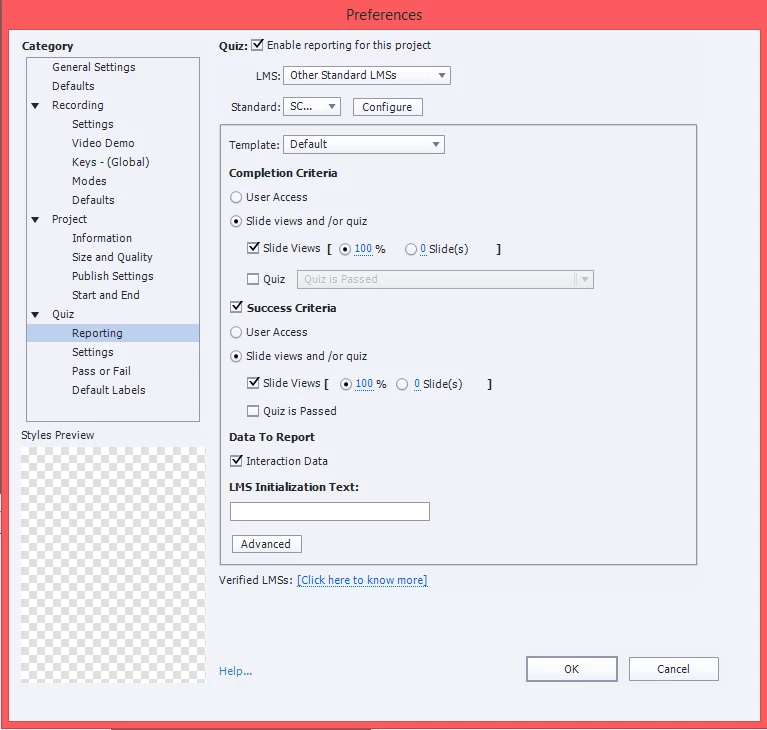
In Summary: Can I trust that, without question, when a checkbox appears in the ToC, that every slide has been viewed at 100% for the purposes of tracking the Completion Criteria of a course? Or are there other factors we aren't considering? Has anyone else had a similar problem with courses not registering as Complete?
Thank you for taking the time to review and reply!


 AdChoices