Known Participant
Sep 3, 2018 11:02 PM UTC
Answered

What is the path to use when I install the assets for Captivate 2019?

What is the path to use when I install the assets for Captivate 2019? In other words, where should I create a folder for the assets when I un-zip the file I downloaded?

Thanks.
This topic is closed to new replies. Start a new post to keep the conversation going.
Lilybiri
LilybiriCorrect answer
Legend
Sep 4, 2018 10:01 AM UTC

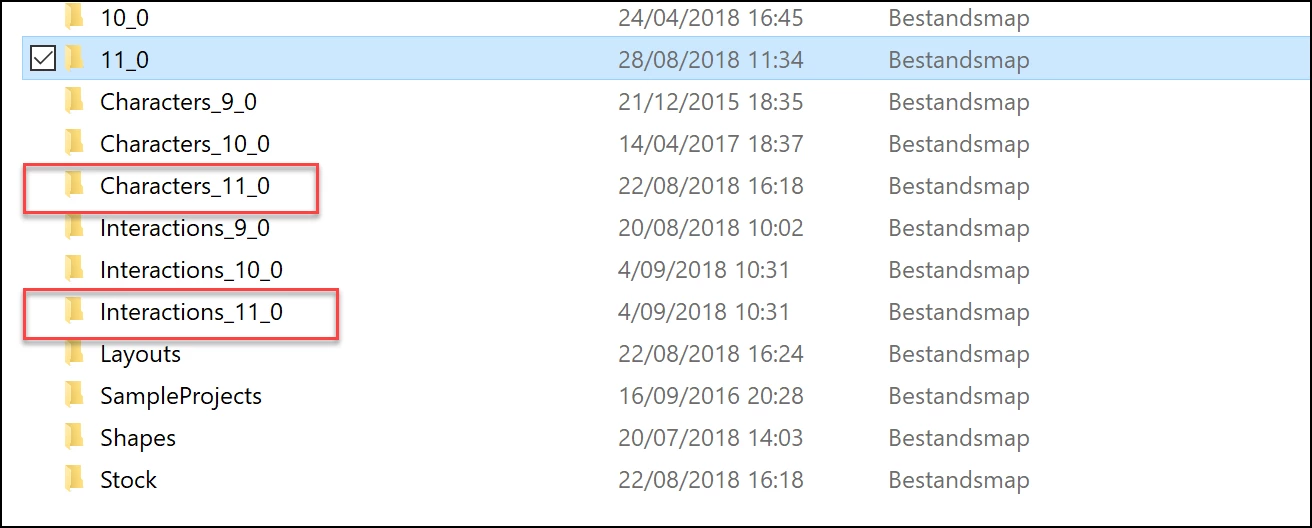
Are you talking about the basic package eLearning Assets? It will be installed in Public Documents (for a Win system) under the folder Adobe. Everything will be available to all users that way. Here is a screenshot (I have 9,10 and 11 installed):

Characters and Learning Interactions have a separate folder. The other assets are allunder 11_0: SampleProjects, ThreeDHotspotIcons and Tutorials. Eventually also devices (later).

3 replies

Lilybiri
LilybiriCorrect answer
Legend
Sep 4, 2018 10:01 AM UTC

Are you talking about the basic package eLearning Assets? It will be installed in Public Documents (for a Win system) under the folder Adobe. Everything will be available to all users that way. Here is a screenshot (I have 9,10 and 11 installed):

Characters and Learning Interactions have a separate folder. The other assets are allunder 11_0: SampleProjects, ThreeDHotspotIcons and Tutorials. Eventually also devices (later).

Translate
Known Participant
Sep 4, 2018 10:12 PM UTC

Thanks. Lilybiri. I saved the zip file to my desktop, so this created an issue with installing. Your help is appreciated.

Translate
Paul Wilson CTDP
Community Expert
Community Expert
Sep 4, 2018 1:32 AM UTC

Same as before. Use the default path that the installer wants to create. 

Translate
Paul Wilson, CTDP