

Nassia K.
Known Participant
Aug 23, 2021 3:40 PM UTC
Answered

What is this symbol?
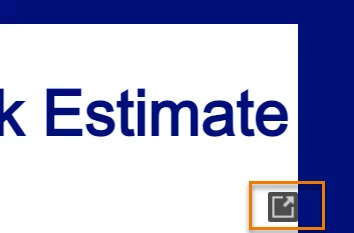
Hello, when I preview my project, on the first page of the project I see this symbol. When I click on it, it shows the title of the slide. I did not add something to help me understand what this symbol is and I would like to get rid of it. Also, I am sorry but I don't know how else to describe it. Thanks in advance for your help!
 

    This topic is closed to new replies. Start a new post to keep the conversation going.
    Lilybiri
    LilybiriCorrect answer
    Legend
    Aug 23, 2021 4:32 PM UTC

    The font size is defined in the object style of that text container, same for all texts. Font size will be decreased when you are on a smaller browser resolution. I would also recommend to set the minimum font size to 10 or 8points instead of the default 14 points to avoid a myriad of those expand buttons all over the slides.

    See this blog post:

    http://blog.lilybiri.com/responsive-projects-object-styles


    3 replies

    Lilybiri
    Legend
    Aug 23, 2021 3:45 PM UTC

    It is the 'expand' button, which appears when the text container is deemed too small to show the full text.

    Make the container bigger and/or reduce the font size. Check also if you didn't add superfluous spaces, line breaks.

    Clicking that button will show the 'full text' in a popup window.

    Was this a fluid boxes project?

    Translate
    Nassia K.
    Nassia K.Author
    Known Participant
    Aug 23, 2021 4:22 PM UTC

    Thanks! That did the trick! What is interesting though is that I did not check the default text size of the image/text slide:


    Good to know! It resolved the issue!


    Translate
    Lilybiri
    LilybiriCorrect answer
    Legend
    Aug 23, 2021 4:32 PM UTC

    The font size is defined in the object style of that text container, same for all texts. Font size will be decreased when you are on a smaller browser resolution. I would also recommend to set the minimum font size to 10 or 8points instead of the default 14 points to avoid a myriad of those expand buttons all over the slides.

    See this blog post:

    http://blog.lilybiri.com/responsive-projects-object-styles


    Translate