


Nassia K.
Known Participant
December 14, 2021
Answered

What to do with Fonts domain?

  • December 14, 2021
  • 2 replies
  • 1804 views

Hello,


This is the first time that I receive this message and I don't know what I should do.
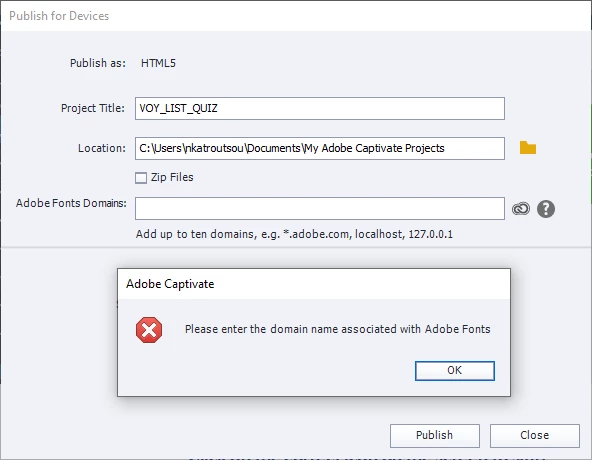
I get this message when I am about to publish my project. Does anyone know what I should add as domain?


Thank you

    Correct answer Lilybiri

    You get this request only if you used Adobe fonts in your project. You need to add the domain(s) to which your published output will be uploaded. Depending on the plan you have for Adobe fonts, you can add more than one domain. If you have the plan included with Captivate, you can indicate only one domain. If you also have a CC license, you can add more domains.

    Example: I have a CC license. If I want to upload the published project to my domain (or subdomain) I will add *.lilybiri.com. To be able to preview locally I also add localhost. If it needs to be uploaded to the domain of a client, I have to ask for its URL.

    2 replies

    Participating Frequently
    March 2, 2023

    Hi, I just had this same issue. I recently updated my Adobe Captivate and I was maintaining a course I developed last year. I do not have any Adobe-associated fonts and this issue has never occurred to me before. I tried using these domains online but my fonts in SCORM are nothing like the ones I used when previewed. Any assistance with this?

    Lilybiri
    Legend
    March 2, 2023

    Apparently you do have somewhere a link to an Adobe font. Can you check the Theme(s) used in this project, and in the Theme Properties you'll find up to 3 fonts. 

    Participating Frequently
    March 2, 2023

    Thanks, I just saw this!

    Lilybiri
    LilybiriCorrect answer
    Legend
    December 14, 2021

    You get this request only if you used Adobe fonts in your project. You need to add the domain(s) to which your published output will be uploaded. Depending on the plan you have for Adobe fonts, you can add more than one domain. If you have the plan included with Captivate, you can indicate only one domain. If you also have a CC license, you can add more domains.

    Example: I have a CC license. If I want to upload the published project to my domain (or subdomain) I will add *.lilybiri.com. To be able to preview locally I also add localhost. If it needs to be uploaded to the domain of a client, I have to ask for its URL.

    Participant
    June 28, 2023

    My course is going to be hosted on our Workday tenant which is my LMS. Do I add that as my localhost or domain?


    thanks in advance for the assistance.

    Lilybiri
    Legend
    June 29, 2023

    Adding localhost is necessary if you want to see the published output locally. It is more important to add the domain where the output will be uploaded. If you have a CC subscription as well as a Captivate license you can add both separated by a comma. But if your Adobe Fonts plan is the one packaged with Captivate you are limited to one domain which needs to be the output domain.
