
Participant
April 20, 2017
Question

When publishing, project information does not populate

  • April 20, 2017
  • 1 reply
  • 240 views

I've been trying to publish a project using Captivate 5.5. I've imported a PPT deck, added my quiz questions, save it, but when I go to publish, the Project information is not populating with any information. When I go to view the material in our LMS, it shows an invalid error.
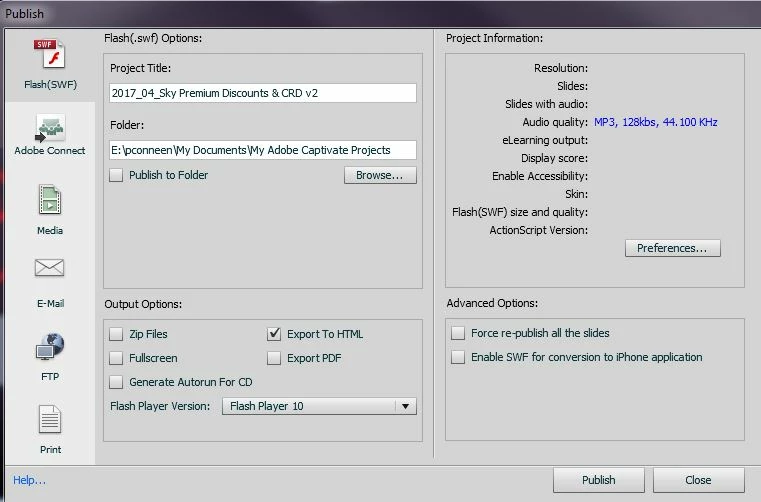
I saw a previous question on the forum and tried to follow the steps, but I'm using a work computer, and we do not have a C Drive, so I cannot follow the steps below.

Can you try to recreate the preferences for Captivate.

Close Captivate.

Go to : C:\Users\[username]\AppData\Local\Adobe and rename Captivate 6.0 folder to Captivate 6.0_old.

Then go to : C:\Users\[username]\AppData\Roaming\Adobe and rename Captivate folder to Captivate_old

Relaunch Captivate and check.

Could you please help me fix the problem?
Thanks

Patty

    This topic has been closed for replies.

    1 reply

    Lilybiri
    Legend
    April 20, 2017

    Oops, Captivate 5.5!

    The work flow you talk about is to refresh the Preferences folder. You have to know where your profile is stored, the Preferences folder is indeed in the AppData under your profile. I cannot remember if that was the same for 5.5 but suspect as much. That work flow to refresh Preferences is used when the Captivate installation is esteemed to be corrupted.

    Participant
    April 20, 2017


    I know - Captivate 5.5

    From the picture I attached, the only information that is showing in the Project Information fields is the audio quality, when normally all the fields are filled in (resolution, slides, Display score, etc.)

    We've never had a problem with saving material with symbols/ characters in the Title field - we do it all the time and it works no problem.

    RodWard
    Community Expert
    Community Expert
    April 21, 2017

    I would try getting rid of the ampersand symbol in the Title field.  That ampersand may be fouling it up.

    Additionally, because the Title field is used to create the actual filenames for the HTM and SWF files when publishing, it's not a good idea to have spaces in the name if you intend putting the published output on a web server or LMS.