
Inspiring
September 13, 2019
Answered

When publishing to html skin buttons disappear

  • September 13, 2019
  • 1 reply
  • 700 views

Hi there,

I created a file in CP 2019, as long as I did'nt publish it, the preview rendered the skin as set up. But as soon as I publish (to html) most of the skin buttons disappear and I can not get them back in the editor. 
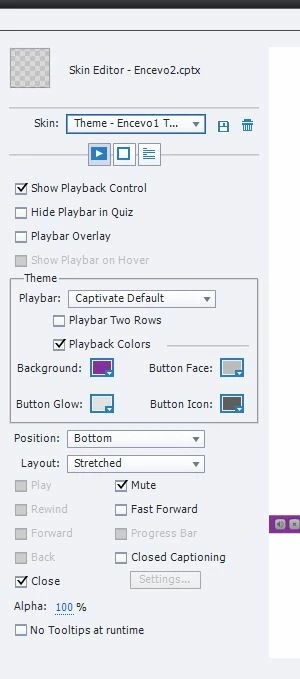
I have set up my e-learning to use the play, and Back and Forward Buttons, and these are exactly the ones missing.

I tried using another skin, I even tried to copy all my slides to a new project, its the same. 

What am I doing wrong? How can I get the needed buttons into the skin?


Help Please.

THX

A.

    This topic has been closed for replies.
    Correct answer Lilybiri
    It's a non-responsive project, the version is 11.5.1.499, there are no pretest slides but yes the quiz is branch aware (i'm branchin because of multiple languages). thx
    Branch aware turns off all navigation buttons by default, also navigation in TOC. You need to take full control of the navigation with custom navigation.

    1 reply

    Lilybiri
    Legend
    September 13, 2019

    Which type of project did you create? Is it a reponsive or a non-responsive project? Which version do you use? Youfind the full version number under Help, About Captivate. I see that most buttons are dimmed,, which is worrying. Do you have Pretest slides or did you turn on Branch aware in Quiz Settings?

    Inspiring
    September 13, 2019
    Hi Lilybiri,
    Inspiring
    September 13, 2019
    It's a non-responsive project, the version is 11.5.1.499, there are no pretest slides but yes the quiz is branch aware (i'm branchin because of multiple languages). thx