
Participant
January 15, 2019
Answered

Where can I download the Email Icon Widget for Captivate 9?

  • January 15, 2019
  • 1 reply
  • 458 views

I downloaded a trial of Adobe Captivate 2019 at home and found the Email Icon Widget under Widgets already pre-installed with Captivate.  However, at work, we use Captivate 9 and it wasn't installed when it was installed.

A quick look on the Adobe Captivate Assets Library online to download available free assets didn't seem to show anyplace where I could download the email icon widget and save it into the appropriate Adobe Captivate Widget folder. 

Can someone point me in the right direction or I may just attach and email the emailicon.wdgt file at home to myself but just wondering if there is a Widget library online.
    This topic has been closed for replies.
    Correct answer Lilybiri

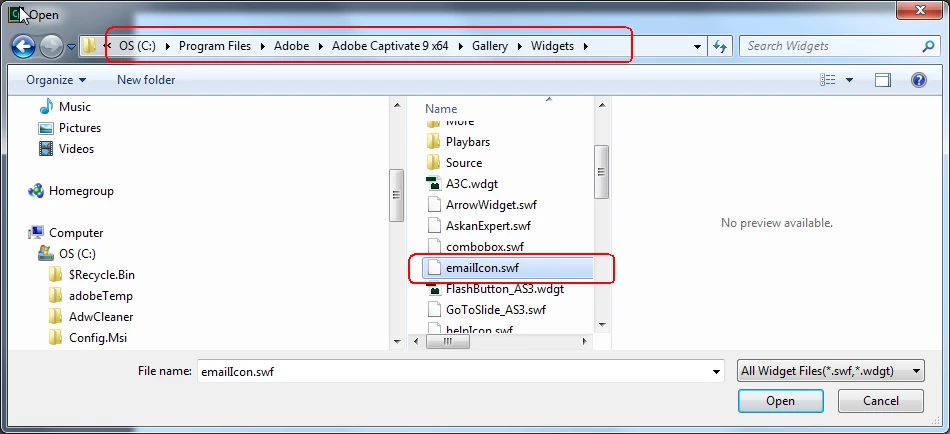
    I double-checked in the installation of CP9 and here is that widget:

    Captivate has Learning Interactions which are normally compatible with HTML output. The Widgets which are only compatible with SWF output should not be used for HTML output. Since the Flash Player disappears soon (end of life programmed for end of this year, but expect browsers to ban it earleir) it is not recommended to use the widgets from that Gallery folder anymore. Those are legacy, and I am very astonished that you tell me they are not available in CP9 which is an older version than CP2019. 

    My suspicion is that when you use Insert, Widgets, the default path is no longer pointing to the Widgets subfolder, but to the Learning Interactions folder in the Public Documents. That is the reason I posted the screenshot above.

    1 reply

    Lilybiri
    LilybiriCorrect answer
    Legend
    January 15, 2019

    I double-checked in the installation of CP9 and here is that widget:

    Captivate has Learning Interactions which are normally compatible with HTML output. The Widgets which are only compatible with SWF output should not be used for HTML output. Since the Flash Player disappears soon (end of life programmed for end of this year, but expect browsers to ban it earleir) it is not recommended to use the widgets from that Gallery folder anymore. Those are legacy, and I am very astonished that you tell me they are not available in CP9 which is an older version than CP2019. 

    My suspicion is that when you use Insert, Widgets, the default path is no longer pointing to the Widgets subfolder, but to the Learning Interactions folder in the Public Documents. That is the reason I posted the screenshot above.

    Participant
    January 15, 2019

    Thanks Lilybiri!  It was mapped to the Learning Interactions folder in Public Documents as you described  The email icon widget is, in fact, located in the Gallery folder as you described.  I had forgotten that Captivate does that. 

    Evidently, the Email Icon Widget should only be used with a Captivate project that will be published in SWF and not HTML as, for the latter, as you mentioned, Flash Player ends later this year.

    Thanks for your help!

    Lilybiri
    Legend
    January 15, 2019

    You're welcome. I think they didn't duplicate the widgets for the simple reason that they are not usable at all for HTML output.