


Participating Frequently
November 23, 2015
Question

Where is the audio options window?

  • November 23, 2015
  • 1 reply
  • 606 views

Hi all

I am using Cp6 and must have inadvertently hidden this window somehow
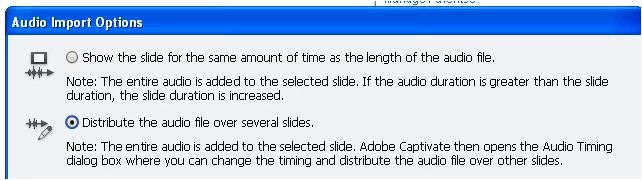
and I canot find a way to distribute my audio files over a number of slides without it. Every method of importing audio ends with the file being added to a single slide and the sliders not being visible on the 'edit audio' timeline.

I have tried starting a couple of new projects but get the same result.

Suggestions most welcome please!

Simon

This topic has been closed for replies.

1 reply

Lilybiri
Legend
November 23, 2015

Did you perhaps use two monitors before? You can clean the preferences, I don't know if the files also exist in CP6 but have a look in the subfolder Utils of the CP installation folder? If you don't have that subfolder, will tell you the manual way.

SiHouseAuthor
Participating Frequently
November 23, 2015

Thanks Lily

I shall need to get my ICT dept to take a look since all of the systems files/folders are restricted access on our LAN. You are right that I normally use two monitors (and am still using two monitors) - but how does that make a difference?

Thanks

Simon

Lilybiri
Legend
November 23, 2015

Because, sorry to tell this, Captivate remembers that situation at this moment and the audio window is probably on the other monitor. If you can connect temporarily a second monitor you should be able to drag everything to the primary monitor again.