Participant
September 18, 2020
Answered

Why are my buttons not working?

  • September 18, 2020
  • 2 replies
  • 959 views

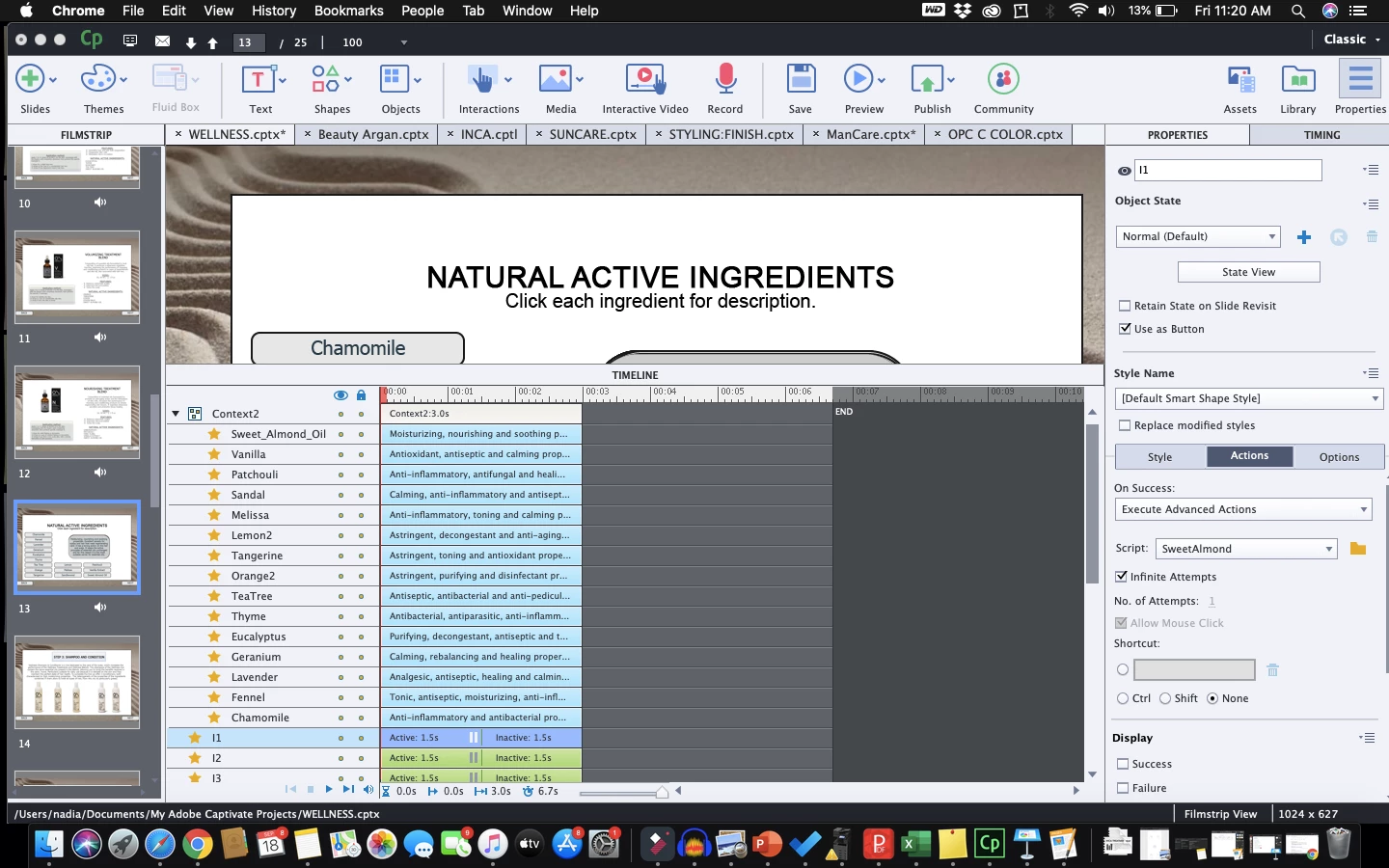
I am new to captivate and am creating some pretty basic projects.  I have created these slides in my projects that have buttons that when clicked, a text box will appear.  I have done this successfully in a few of my projects.  There is only one segment where only 1 of my 15 buttons will work.   I followed all of the same steps and checked my advanced actions.  I know this is super basic but I couldn't find anything on the chat that was specific to my challenge.  Any help is welcome.  Attached is an image of my page.

    This topic has been closed for replies.
    Correct answer Lilybiri

    It is a Show/Hide workflow, where you hide the group of texts and show the appropriate one. That is an older workflow but should work perfectly. I also prefer using a multistate object, because you don't have to reset the slide when revisiting which is necessary with a Show/Hide workflow.

    It is not the reason that your buttons are not working, that is sure. It would have been better to use instances of one shared action (two parameters) than 15 duplicates on a slide. Not sure if that can be the reason, although I have debugged files for clients which were choking on a too big amount of duplicate advanced actions. 

    All buttons have their pausing point at the same location, which is fine. Since it is an advanced action, the play head will never be released.

    Except possible choking (I don't know how many advanced actions you have in the full project) the only problem could be with labeling. Did you ever use the same namefor two different items, even though they are of a different type?  

    I am a bit worried about the labels of your decisions as well... those are not the normal generic names: Untitled1_1.... Did you get that advanced action from someone else or from a Quick Start Project? You don't seem to know the Preview button for advanced actions. Have a look at:

    http://blog.lilybiri.com/advanced-actions-dialog-box-in-captivate-2017

     

    2 replies

    Stagprime2687219
    Legend
    September 18, 2020

    It is hard to tell from the information provided but I am inclined to think that you have a separate text box object for each of your buttons.

    If that is the case, I would ask if you are properly hiding all of the other text boxes each time a new button is pressed...?

    If not - newly revealed boxes that are layered underneath the top-most box will not be seen.

    I might suggest a single text box that has multiple states. That way when you click a new button proper visibility will be sort of built-in.


    Hope that helps.

    Participant
    September 18, 2020

    Here is a picture of my action.  I have grouped all of my text boxes to "Context2".  So in my action for each button I will hide the context2 and show the specific text box I want shown.  I thought it may be because there are too many buttons as this is the most I have done so far on 1 slide.

    Stagprime2687219
    Legend
    September 18, 2020

    Is the Sweet Almond the one button that works or is it one of the ones that does not work?

    Lilybiri
    Legend
    September 18, 2020

    Can you iinsert a screenshot of the Preview of that advanced action 'SweetAlmond' please?


    Participant
    September 18, 2020

    Lilybiri
    LilybiriCorrect answer
    Legend
    September 18, 2020

    It is a Show/Hide workflow, where you hide the group of texts and show the appropriate one. That is an older workflow but should work perfectly. I also prefer using a multistate object, because you don't have to reset the slide when revisiting which is necessary with a Show/Hide workflow.

    It is not the reason that your buttons are not working, that is sure. It would have been better to use instances of one shared action (two parameters) than 15 duplicates on a slide. Not sure if that can be the reason, although I have debugged files for clients which were choking on a too big amount of duplicate advanced actions. 

    All buttons have their pausing point at the same location, which is fine. Since it is an advanced action, the play head will never be released.

    Except possible choking (I don't know how many advanced actions you have in the full project) the only problem could be with labeling. Did you ever use the same namefor two different items, even though they are of a different type?  

    I am a bit worried about the labels of your decisions as well... those are not the normal generic names: Untitled1_1.... Did you get that advanced action from someone else or from a Quick Start Project? You don't seem to know the Preview button for advanced actions. Have a look at:

    http://blog.lilybiri.com/advanced-actions-dialog-box-in-captivate-2017