
Inspiring
October 21, 2015
Answered

Why are playbar colors different in browser preview?

  • October 21, 2015
  • 4 replies
  • 360 views

Hello

The playbar function appears not be functioning correctly in all my Captivate 8 projects.

In the Skin Editor I set the Playback colors, but when I preview it in the Browser the buttons Face and Icon are always grey and black:

In the Skin Editor:
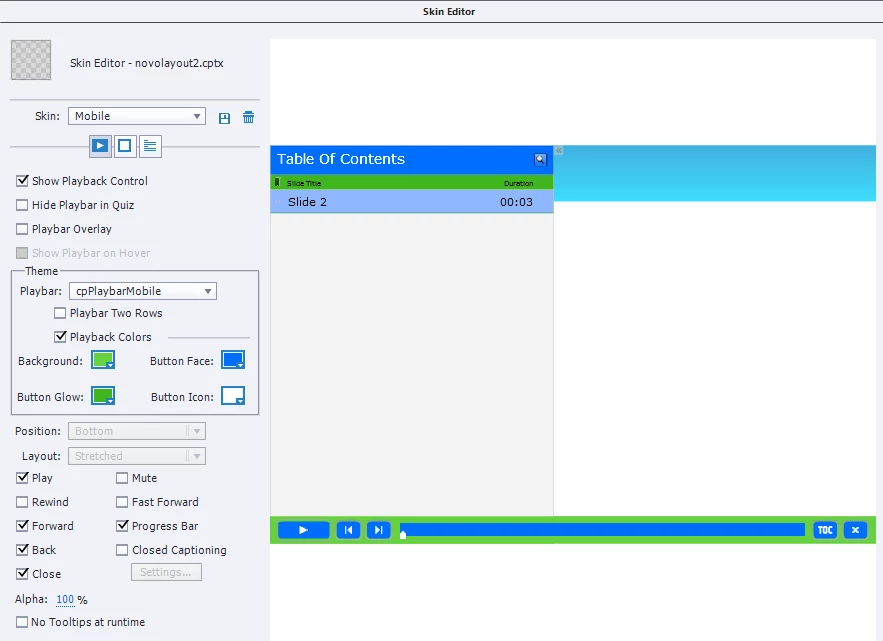
And in the browser:

How to solve this?

This topic has been closed for replies.
Correct answer Marcia8

Update:

Adobe staff contacted me and help me solving the problem.

Apparently the problem is a bug in 32 bit version of chrome, which I was using. So I had to update to 64 bit version of chrome and the playbar colors now seems to be Ok.


Thank you.

4 replies

Marcia8AuthorCorrect answer
Inspiring
October 27, 2015

Update:

Adobe staff contacted me and help me solving the problem.

Apparently the problem is a bug in 32 bit version of chrome, which I was using. So I had to update to 64 bit version of chrome and the playbar colors now seems to be Ok.


Thank you.

Marcia8Author
Inspiring
October 22, 2015

Adobe Staff:

So there is no phone number, no e-mail, only this forum where no one answers, I don't think it's normal such a big multinational not having any contact, or customer support, nothing. This is very strange. I will never buy anything from Adobe, and I want an e-mail so I can do a complaint.

Marcia8Author
Inspiring
October 22, 2015

I have a project to deliver very soon and I can't do it with the playbar looking like that.

I don't have access to chat, and the number adobe provides is not available in my country.

So, where can I have personal technical assistance from adobe to solve the problem??

Can someone from Adobe answer?

Marcia8Author
Inspiring
October 21, 2015

Note:

This only hapens in Google Chrome, I just found out that in Microsoft Edge the colors of the playbar are ok.