
Known Participant
September 15, 2016
Answered

Why aren't my shape buttons anchoring when copied?

  • September 15, 2016
  • 3 replies
  • 332 views

Hello everyone. I was wondering if you could help me figure out a solution to my buttons (shape) not anchoring to the end of the timeline when copied as the normal buttons and items do.
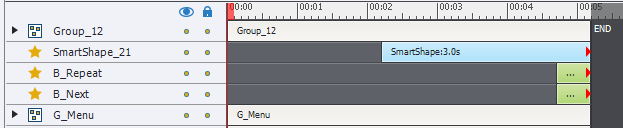
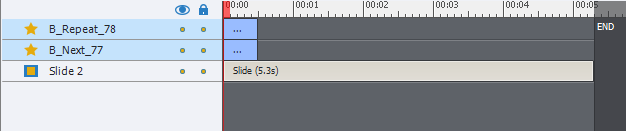
 skjermbilde       skjermbilde_2 


Thanks to anyone who can shed some light on this.

This topic has been closed for replies.
Correct answer Lilybiri

Does the shape button then show at the end of the other slides in the slide? Or does it show for the whole slide?


Indeed, sorry about that. There seems to be no way to do this automaticallly. Using Apply to items of this Style in the Timing panel, will move all buttons with that style to the same starting point on a slide, but never will the anchor be preserved. I'm sorry, cannot find a way.

3 replies

Lilybiri
Legend
September 15, 2016

I don't understand this question at all. On the first screenshot the shape button and the normal buttons are anchored to the end of the timeline (something I never like myself). On the second screenshot I only see two buttons at the start of the timeline, what is your problem? Moreover those timelnes are very short, why? There are no pauses on any of those interactive objects, what is their goal? It looks very weird to have three interactive objects, meant to trigger an action, that only appear for a very short time on the slide because of no pausing?

From coaching CP-trainings I learned that this is very confusing: displaying an object till the end of the slide (as TLCMediaDesign suggest) is different from anchoring the end of an object timeline to the end of the slide timeline. In the first case, the starting point of the object will never move if the slide timeline is extended or decreased but the end point will always be the same as the slide endpoint. In the second case (anchor) when changing the duration of the slide, the starting point of the object will move, because its timeline duration will not change, the end point will be the same as the slide endpoint.

98108940Author
Known Participant
September 16, 2016

On the first button, you see the original design. The second is a copied pair of the buttons, where the anchor at end part have not been transferred to the copied buttons. The timelines are short because they show a test of the buttons where they are supposed to come in at the end with opacity and emphasis timing animations, these will disappear if you group them up with other objects I have discovered. The slide pauses at the end so that the user have to click trough to the next slide. 

I'm not confused about the difference between show for the rest of the slide and the anchored show for a limited time options. 

TLDR; Why don't the buttons gain the anchored trait when you copy and pase them?

RodWard
Community Expert
Community Expert
September 16, 2016

If an object on the timeline does not reach to the end of the timeline, select it and hit Ctrl + E key combination to set the Timing of the object to Rest of Slide.  If the object currently is touching the end of the timeline but shows that red triangle at the end then you may need to pull it a bit away from the end before the above will work.

BDuckWorks
Inspiring
September 15, 2016

Try moving the playhead to the end of the slide before pasting the in, other wise just drag both of them to the right until the red triangle appears.

The timeline is a fickle beast...

98108940Author
Known Participant
September 16, 2016

That works. But it wont be an effective solution unless you know a hotkey to put the playhead at the end of the slide. 

TLCMediaDesign
Inspiring
September 15, 2016

Is it set to display for rest of slide or a specific time?

It needs to be set to display rest of slide.

98108940Author
Known Participant
September 16, 2016

If i do that it don't stick to the end but rather... well shows for the rest of the slide, not containing it's original length.