
Inspiring
February 22, 2017
Answered

Why can't I delete slide?
  • February 22, 2017
  • 1 reply
  • 416 views

I am trying to delete a slide in Captivate 8 on a Windows 8 computer.

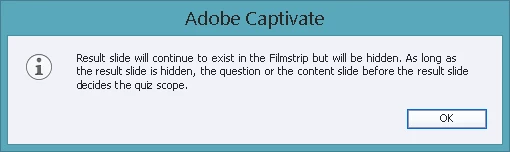
The slide was originally hidden. When I try to show the slide by right clicking the slide, and selecting Show Slide, then clicking delete, it still does not allow me to delete the slide.It goes back to a hidden slide. I get the screen shot above.

I am using this Captivate 8 as a template that was created for me. However, it's NOT a cptm file but a cptx file.

Thanks

This topic has been closed for replies.
Correct answer RodWard

You're trying to delete the Quiz Result slide.  Once you add a quiz into a project you always have a Quiz Result slide, hidden or not, and it cannot be deleted.  That's just the way Captivate is designed.

1 reply

RodWard
Community Expert
RodWardCommunity ExpertCorrect answer
Community Expert
February 22, 2017

You're trying to delete the Quiz Result slide.  Once you add a quiz into a project you always have a Quiz Result slide, hidden or not, and it cannot be deleted.  That's just the way Captivate is designed.

AnotherMeAuthor
Inspiring
February 22, 2017

Thanks. So just as long as I "hide the slide" it won't publish and the viewer won't see it?

RodWard
Community Expert
Community Expert
February 22, 2017

Correct.  Hide it if you don't want to see it at runtime.  But remember that this slide performs certain functions that cannot be duplicated in other ways when it's hidden.