Inspiring
January 16, 2018
Answered

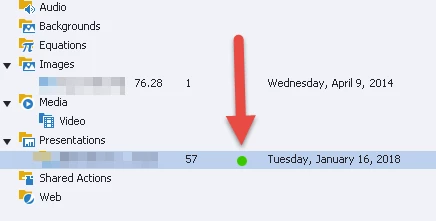
Why is there a green circle in Captivate 8 Library?
  • January 16, 2018
  • 1 reply
  • 359 views

Can anyone tell me why there is a green circle in Captivate 8's Library after I create a Captivate file from PPT?

Thanks

This topic has been closed for replies.
Correct answer Lilybiri

It is an indicator that exists for any loink with an external file in another application. It also can be found next to an imported Photoshop file. Green indicator means that Captivate is synchronized with the external application, red means that the file has been updated externally and couls be re-synchrnoized if you want.

1 reply

AnotherMeAuthor
Inspiring
January 16, 2018

Now there is a red box!

I closed Captivate after creating a PPT file. I choose Link.

I went into PPT and removed all transitions and saved.

Lilybiri
LilybiriCorrect answer
Legend
January 16, 2018

It is an indicator that exists for any loink with an external file in another application. It also can be found next to an imported Photoshop file. Green indicator means that Captivate is synchronized with the external application, red means that the file has been updated externally and couls be re-synchrnoized if you want.

AnotherMeAuthor
Inspiring
January 16, 2018

Thanks! And I noticed clicking on the red circle will update the external file.

Very cool.

By the way, how many ways is there to update an external file from within Captivate 8?

I believe there was three:

  1. Clicking the red circle will update
  2. Right click on the library item will update
  3. Clicking the update icon in the tab in the library will update....

Did I miss anything?