
Known Participant
November 1, 2018
Question

Why While loop deosn't work?

  • November 1, 2018
  • 2 replies
  • 1301 views

After a lot of efforts, I found a code thanks to TLCMediaDesignhere : Re: How to Execute javascript in Specific Frame of the Timeline?

This is the code in JS Window :

window.cpAPIEventEmitter.addEventListener("CPAPI_VARIABLEVALUECHANGED",function(){

if(window.cpInfoCurrentFrame === 90)

{

  JavaScript Goes Here

}

},"cpInfoCurrentFrame");

It will fire JavaScript code on a specific frame (for example frame 90) in the timeline...

Then I build my project based on that JS code to fire my own JS code on second 2 of the timeline.

Here is Screen Shot of my simple project :
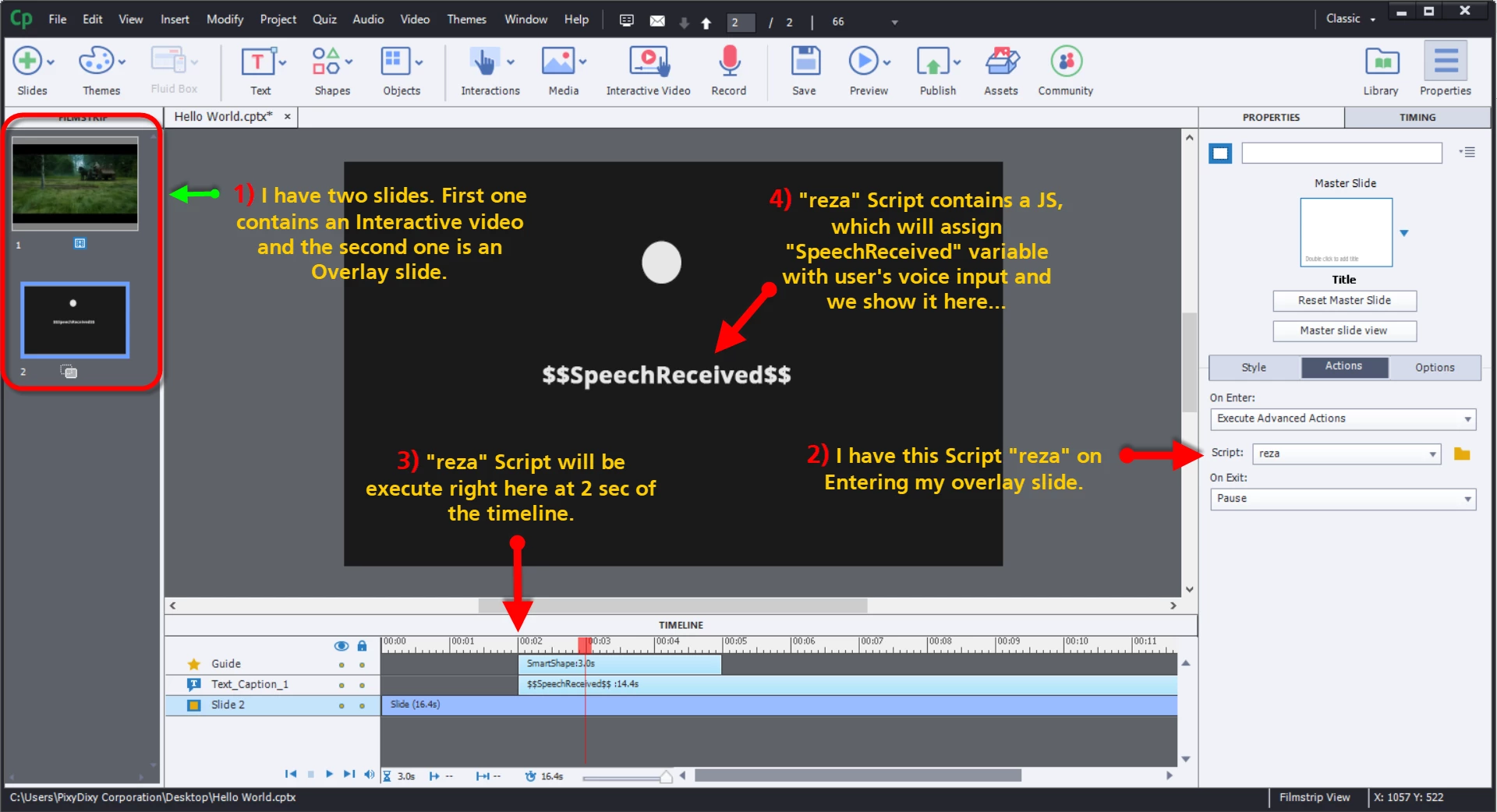
And these are my decisions that construct "reza" script :
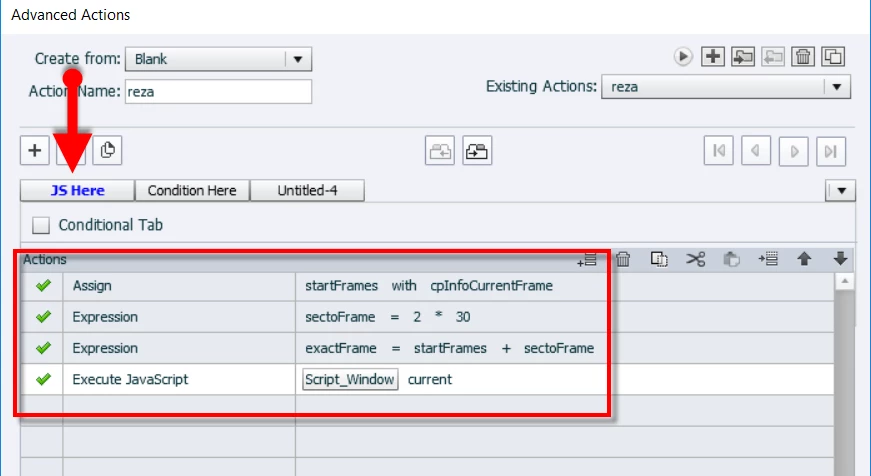
First three actions calculate the exact frame of second 2 of the slide, and save that frame number to "exactFrame" variable.

Then thanks to TLCMediaDesigncode it executes the Script_Window right at second 2 of the timeline.

in Script_Window I have a JavaScript to change the value of my variable named "SpeechReceived" and also it pauses the timeline

using this code :

window.cpAPIEventEmitter.addEventListener("CPAPI_VARIABLEVALUECHANGED",function(){

if(window.cpInfoCurrentFrame === window.exactFrame)

{

  cp.movie.pause(cp.ReasonForPause.CPCMNDPAUSE);

  SpeechReceived = "hello";

}

},"cpInfoCurrentFrame");

Now please look at my last decision :

I want to continue my paused timeline whenever "SpeechReceived" is equal to "hello" but here is the problem : although my variable "SpeechReceived" changes to "hello" nothing happens ... it seems that while loop doesn't work and something goes wrong here...Am I missing Something ???

Any Idea how to fix that bug ???

This topic has been closed for replies.

2 replies

Known Participant
November 1, 2018

God, Really? We can not do such simple thing Using Captivate ?! Please Someone Tell Me That I missed Something

Inspiring
November 2, 2018

It seems to me that the logic is a bit off. I think what you really want is to wait until you get the response that you expect. In other words,

While SpeechReceived is NOT "hello"

     No action (waiting for the correct response, so do nothing)

If SpeechReceived == "hello"

    Continue (or jump to a frame, or somehow exit from the loop and advance the playhead)


At least that's how I would approach it writing code. I'm still on CP9 and so can't test out the loop as an AA.

But do you really need the loop in the first place? Is anything else happening that has to continue happening while waiting for the response? If not, and the listener will fire the action when the value of SpeechReceived changes, just do the simple IF statement and forget the loop.

Known Participant
November 2, 2018

I really don't need while loop but If statement doesn't work too ... It just doesn't ...

TLCMediaDesign
Inspiring
November 1, 2018

You most likely are running into an issue because you paused and continue will not release the playhead. You would need to use resume.

Don't understand the logic of the while loop though.

Known Participant
November 1, 2018

"Don't understand the logic of the while loop"... Well I want to continue the movie whenever "SpeechReceived" is changed by javascript window to "hello".

just after javascript sets the value of variable "SpeechReceived" to this string "hello", I want to proceed and continue the movie ...

To be more clear I used these lines of code to inject my string variable ("hello" for example) from javascript to captivate and I was successful because I can see changing variable "SpeechReceived" on my screen. But the poblem is eventhough I see "SpeechReceived" is changed to "hello" while loop doesn't work and I can't "Continue" the movie ...

Code Here :

window.cpAPIEventEmitter.addEventListener("CPAPI_VARIABLEVALUECHANGED",function(){

if(window.cpInfoCurrentFrame === window.exactFrame)

{

  cp.movie.pause(cp.ReasonForPause.CPCMNDPAUSE);

speechResult ="hello";

    window.cpAPIInterface.setVariableValue("SpeechReceived",speechResult);

}

},"cpInfoCurrentFrame");

I don't know what do you mean when you say "You would need to use resume" ? How can I do that ?

TLCMediaDesign
Inspiring
November 1, 2018

What I'm saying is that you pause the movie with JavaScript and then turn right around and want it to resume if the variable is set to Hello, which you just did in the script..

I really don't know exactly what you are trying to do on the timeline, but it just looks like you are setting a couple of variables and changing a display variable at a specific point.

After SpeechReceived is set to "Hello", how would it be set to something else?