

Windows Captivate 2019 - Random Quiz Forms
I have a 21 question quiz that I've been trying to randomize all day today.
Goals for this Quiz
- Randomize the answers - done
- Create a working quiz - done
- Create a completely randomized quiz (questions and answers) - done
- Publish for devices - done
- Opening the project in HTML - Will Not Render
Problem description
Upon publishing the project for devices, you are given the option to review the project published in HTML, if you choose not to, you can open the index.html from the location you publish the project.
Within the Publishing workflow: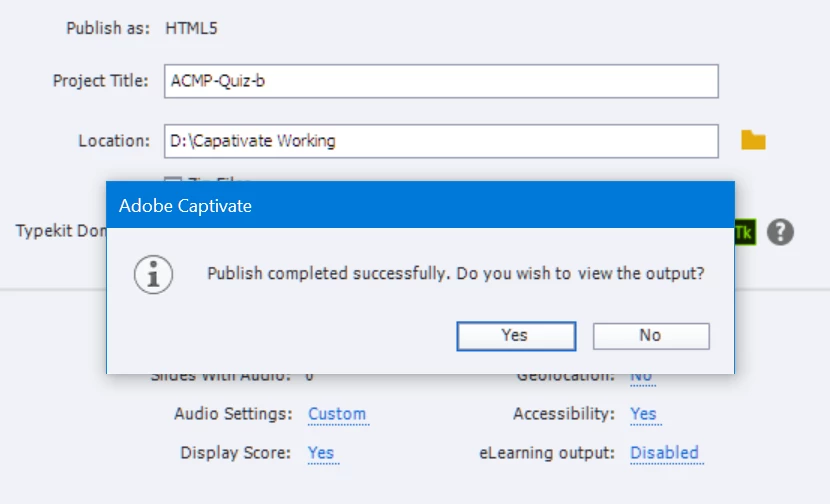
When I select [Yes], it attempts to open this URL:
http://localhost:50012/preview/HTML5Temp48483060390Publish/index.html
And there it will stay without rendering, but the nice rotating progress indicator. Nothing is rendered to the screen and I've waited a full hour, just in case it was a local performance issue.
The same rendering behavior occurs when I attempt to open the index.html (Chrome, IE, Edge).
I've got a feeling it's a setting or something to do with just upgrading today to the latest version.
Update to 11.0.1.266 (CP2019) by Lilybiri on Sep 29 2018 4:23 AM
Your advice and recommendations would be most welcome.
I haven't yet, subscribed to any of the services to upload the project. If you need a copy to diagnose, please let me know and I'll do a dropbox link.;
System Configuration
- Intel NUC8i7HVK
- 32 GB RAM
- 500GB M.2.
- 120GB M.2
- OS MS Windows 10 Pro for Workstations - Windows Insider Version 18298.rs_prerelease.181205-1436
There's plenty of headroom for Cp!


 AdChoices