


aureliab1
Known Participant
July 9, 2021
Question

Working in State View

  • July 9, 2021
  • 2 replies
  • 949 views

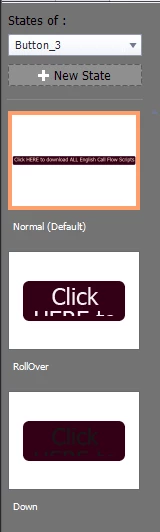
I am needing advice on how to fix a problem in the State View. In my Normal View I have the button the size I need it to be. In the Roll over and Visited Stqate, the button is the original size, which you can see when you click the button during the training. How do I fix the RollOver and Visited views to stay the same size as the Normal view?


    This topic has been closed for replies.

    2 replies

    Paul Wilson CTDP
    Community Expert
    Community Expert
    July 12, 2021

    Sometimes the easiest way to correct something (not just true in Captivate) is to delete it and start from scratch. In this case, I would delete the Rollover and Down states. You can delete states by right-clicking on those states and selecting Delete State.  Once those are deleted right-click on the normal state and select Add State. Select the Inbuilt State for Rollover. Repeat these steps to recreate the Down state as well. You will have three identical versions of the Normal state for all three of your states. Now you can modify the Rollover and Down states to your liking. Once you are finished I would recommend that you save this new configuration as an Object Style so you can easily apply the design appearance to other buttons throughout your project.

    Paul Wilson, CTDP
    aureliab1
    aureliab1Author
    Known Participant
    July 12, 2021

    Thank you, that worked! And thanks for all of the YouTube videos! 

    Paul Wilson CTDP
    Community Expert
    Community Expert
    July 12, 2021

    You're welcome. Don't forget to subscribe to my YouTube channel if you like what I'm doing. I need all the support I can get.

    Paul Wilson, CTDP
    Lilybiri
    Legend
    July 10, 2021

    Not sure which type of 'button' you are talking about, but it looks to be a shape button? Can you please confirm?


    What you show is NOT the default behavior. If you convert a shape to a button, the Rollover and Down states are locked to the Normal state for their size and location. You could add objects to states, but the core region (clickable) should be the same. I wait for your answer to my first question. You may have a look at my overview of the 6 button types in Captivate 11.5 (not sure which version you use).

    http://blog.lilybiri.com/overvew-6-button-types