
Participant
January 5, 2017
Answered

Wrap text in text entry box?

  • January 5, 2017
  • 2 replies
  • 2297 views

Good Afternoon! I am working on a project where I would like to use a text entry box to obtain user feedback. The problem that I am running in to is that the current settings are not allowing the text within my entry box to appear in a wrap format, which will be needed for lengthy responses. Does anyone know a work around for this issue? I appreciate the help! 
    This topic has been closed for replies.
    Correct answer Lilybiri

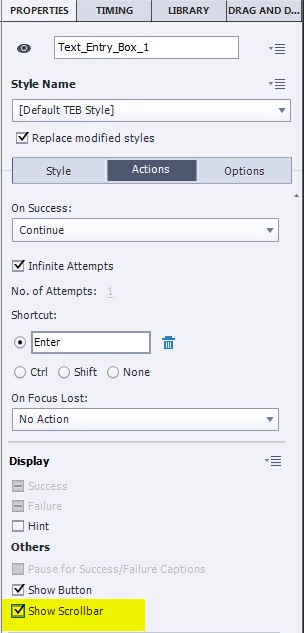
    You have to check the option 'Show Scrollbar' in the Actions tab for the TEB:

    However: the amount of text that can be entered is limited. It used to be 256 characters but is less now.

    Alternative is the Scrolling Text Interaction

    2 replies

    Participant
    April 4, 2020

    The Show Scrollbar does work BUT it removes the ability to use the Enter key.  I was simulating an Excel document and normal function is to hit Enter to go to the next line but with Show Scrollbar selected, I have to press Ctrl+Enter to submit the text entry box.

    Lilybiri
    LilybiriCorrect answer
    Legend
    January 5, 2017

    You have to check the option 'Show Scrollbar' in the Actions tab for the TEB:

    However: the amount of text that can be entered is limited. It used to be 256 characters but is less now.

    Alternative is the Scrolling Text Interaction

    bmosier01Author
    Participant
    January 5, 2017

    Thanks Lilybiri! What an easy fix  In a following slide I am using a box referencing the text entry box as a variable, but the wrap text doesn't seem to be translating over to that page. Any idea why that might be?

    computer wrap screen

    Lilybiri
    Legend
    January 5, 2017

    You have to Preview the project (best in Browser or HTML in Browser) because the user variable will only be replaced by its value at runtime. Since you use it for a short answer, maybe have a look at this example where I used a Scrolling Text Interaction:

    Custom Short Answer Question - Captivate blog