
Rumbalotte
Known Participant
February 5, 2020
Question

Wrong Color in Browser

  • February 5, 2020
  • 3 replies
  • 1165 views

[SOLVED - See below.]

I created some Smartshape Boxes and give them the red color (EA1C0A) 

Here a screenshot: 
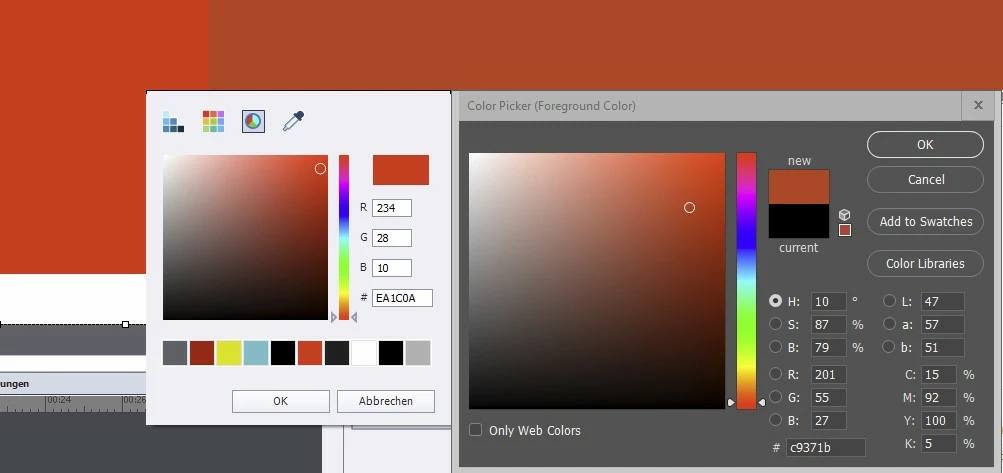
If I then publish the project as html5 and look in the browser (Chrome), the colors are wrong. I compared both colors in the picture. On the left is the color from Captivate. On the right is a screenshot and the color in Photoshop. The colors are also next to each other at the top. Where does this problem come from and how can I solve it? Of course, it also affects other colors.


This topic has been closed for replies.

3 replies

Rumbalotte
Known Participant
February 6, 2020

Okay, I have it.

Here is the solution: https://www.faqforge.com/windows/fixed-google-chrome-wrong-color-after-update/

Thank you very much for all the tips and help. Now it's solved.

Paul Wilson CTDP
Community Expert
Community Expert
February 6, 2020

A couple of things to consider. Is this smart shape partially transparent? The colour codes could be one thing, but the opacity mixed with the background could alter that colour in the published version. Also, make sure you are publishing with the appropriate quality settings for each slide. For example, if you have set the slide for a quality selection of 8-bit, it might change the appearance of the published version of the smart shape. Try High 24-bit or select Optimized for a more accurate colour. When you choose Optimized you will get the following warning which what made me think of this for your situation:

Optimizing the colours of the slide will ensure the best possible picture. This is beneficial if the colouring appears drastically wrong. However, optimize the colour only if necessary as it increases the size of the project.  

Paul Wilson, CTDP
Rumbalotte
Known Participant
February 6, 2020

Thanks for your answer. I often watch your videos. Thanks for all the information.


It is a very simple smart box. Nothing special. No transparency. No gradient. Nothing. Only the box. Entered the hex number. That was it. I have set all slides to high, 24-bit. I use Win10 and Chrome as a browser. My two monitors are calibrated. I am a very experienced user. I have been using Captivate since version 4 or so. I work a lot with Photoshop, Illustrator, AE, Premiere, 3D Tools etc. I've also implemented a lot of Captivate projects, but I've never noticed that. It's the first time.

Oh, wow, wait. I just checked the output in Firefox. The colors are right! How can that be?

Okay, then it looks more like a Chrome problem! Although I currently cannot imagine how that will come.

Lilybiri
Legend
February 5, 2020

Probably a not websafe color. Try to limit in Photoshop to websafe colors and double check.

Rumbalotte
Known Participant
February 5, 2020

I give a hex color to a Smart Box in Captivate. Then I publish the project as HTML5. Then I look at the project in a browser. And then the hex color doesn't match what I gave the box in Captivate? Is this correct behavior?

Lilybiri
Legend
February 5, 2020

Indeed if you talk about a color which is not WEBSAFE. Look in Photoshop, you can see if that color is websafe.