
iasmif91407090
Known Participant
October 14, 2016
Answered

x button in Text Entry box when I preview it on an HTML 5 browser

  • October 14, 2016
  • 1 reply
  • 481 views

Dear all,

I use Captivate 9 (version 9.0.1.320) on Windows 7.

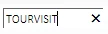
When I preview a project with text box entries on HTML 5 browser, a close button appears after entering my input (see the attached image).

That x button clears off my input. How can I get rid of that. It is probably worth mentioning that it doesn't matter whether or not I have the Retain Text check box ticked.
Thank you in advance,
Iasmi

This topic has been closed for replies.
Correct answer TLCMediaDesign

If don't want to see the X in preview you will either need to create a CSS file in the HTML templates directory and include the CSS file in the index.html or add the style to the index.hrml.

C:\Program Files\Adobe\Adobe Captivate 8 x64\HTML\index.html

Add:

<style>

::-ms-clear {

      display: none;

  }

</style>

Ad it just above the  open script tag <script>

1 reply

TLCMediaDesign
Inspiring
October 14, 2016

If it's html5 you can add this to the CPLibraryAll.css  file:

::-ms-clear {

      display: none;

  }

iasmif91407090
Known Participant
October 17, 2016

Hi TLCMediaDesign,

I've added the suggested tags in the css file but I cannot see any difference, when previewing the project on a HTML 5 browser.

However, when I published the project and opened the html document the x button is not there, probably because it plays the project from my local folder.

Kind regards,
Iasmi

TLCMediaDesign
TLCMediaDesignCorrect answer
Inspiring
October 17, 2016

If don't want to see the X in preview you will either need to create a CSS file in the HTML templates directory and include the CSS file in the index.html or add the style to the index.hrml.

C:\Program Files\Adobe\Adobe Captivate 8 x64\HTML\index.html

Add:

<style>

::-ms-clear {

      display: none;

  }

</style>

Ad it just above the  open script tag <script>