Answered
X in text entry box
I am working in Captivate 8 & IE 11 and have uploaded a course that contains a text entry box. When the user begins typing into the text box - the large X displays taking half of the space of the text box.
Any solutions?
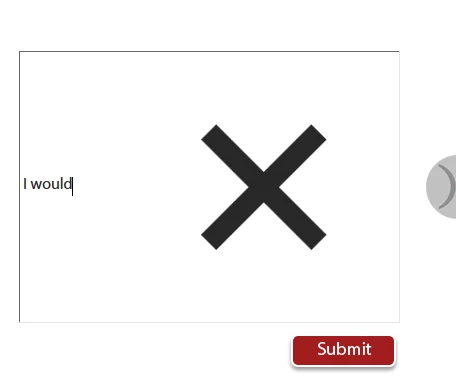

I am working in Captivate 8 & IE 11 and have uploaded a course that contains a text entry box. When the user begins typing into the text box - the large X displays taking half of the space of the text box.
Any solutions?
The X appearing is specific to HTML publishing and viewing the file in IE. My initial impression when I saw the same thing was that it's the TEB indicating that what is being typed is incorrect, but it's actually a button to clear the text. Not very intuitive, but if you check the option "Show Scrollbar" the X won't appear. Enabling the scrollbar also means that text starts at the top of the TEB and will wrap inside it.
Already have an account? Login
Enter your E-mail address. We'll send you an e-mail with instructions to reset your password.
 AdChoices