
Raph5911169558
Inspiring
February 7, 2020
Question

Yes "Button" but NO (button) ACTION?

  • February 7, 2020
  • 1 reply
  • 1047 views

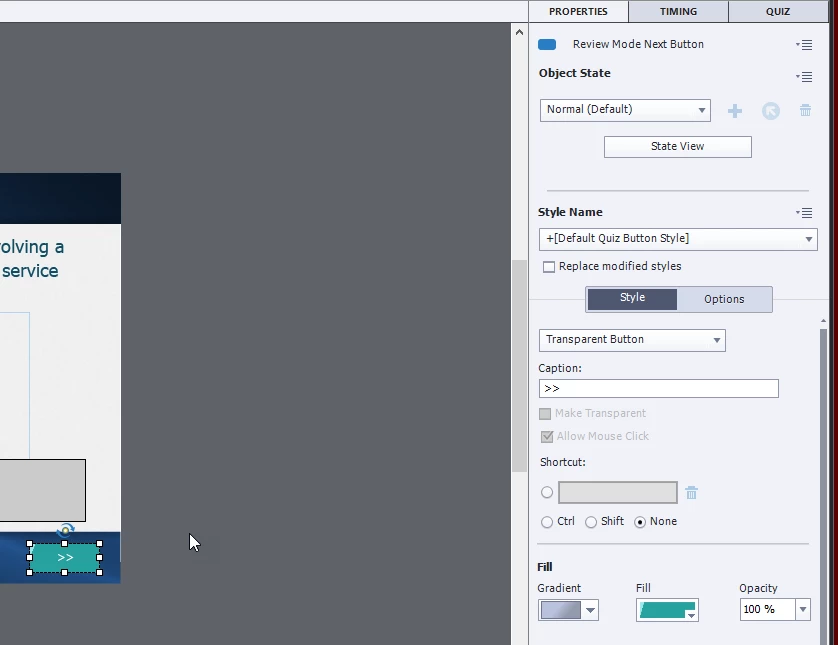
I got a group of buttons from the Asset Library. Now that I'm trying to use them the ACTIONS (section, in Properties), but as you can see below, despite Captivate calling it a "Transparent Button" under the Properties panel. BUT... I don't under why I'm not seeing ACTION for the button. 
 

This topic has been closed for replies.

1 reply

Lilybiri
Legend
February 7, 2020

This is a Quiz button, not a normal button. Moreover it is a Review navigation button. I am not sure, but is it dragged out of the slide in the scratch area as well?

Quiz buttons are embedded, part of the quizzing master slides and you cannot define actions for them. Are you new to Captivate? 

To confirm it is a Quiz button, look at the Timeline: do you see an individual timeline for that button?

Raph5911169558
Inspiring
February 8, 2020

Ouch. I used it exclusively for five years, but then Articulate became the prodoment requirement for hiring. So I fell out of practice. However, I got back in on the back of Pooja's book (5th), and paul wilson videos, and linkedinLearning. In November, and December. But haven't had the chance to apply any of that till now. now. So it's been a few weeks since I've done anythign with it. And I'm pretty sure I never made a quiz, so in which case then "yeah" actually, I am new to Captivate... quizing. 


And I downloaded a button set from the Library and was using those, and they came with <<'s and back and >>s and Next. But since I can't see their actions, so I don't know what is which and FOR what and how. 


I thought I would do the "SUBMIT ALL:" (at the end of the quiz). 


Speaking of quizes, I have Review Quiz on, but can't find where you set that text. ( i wanted to, if possible have the REVIEW AREA (after the take the quiz) say which module the question came from. This is supposed to be one of this FINALs for Certification (and WORSE, there's no consequence job-wise , and no interventions planned if they fail)


And then I could slide into bitching about work in general, but while save that for another time. (phone interview with MERCK on Thursday!) 


Raph

(alison)


Lilybiri
Legend
February 8, 2020

I have written more than 20 blogs about Quizzes. You can find all links in a pdf in this post:

https://elearning.adobe.com/2019/11/quiz-resources/


Have a look at the sequence of 6 starting with Quizzes, Terminology... Submit Process... Master slides... Preferences etc.

Every detail in the default quizzes setup is explained. You are in for a lot more than you'll find in books, and for sure in videos  To me it looks like you really need to go back to basics. Then you can come back with more specific questions. There are quite a lot of blogs about tweaking as well, but yuu need to refresh the basics, which have been changed since you were used to Captivate.


Example: It is not because you 'use' the button 'Submit All' that this will happen on Quiz slides. You need to set this up in the Quiz Preferences, and for the default quiz slides the normal Submit button will be automatically replaced by Submit All and a warning message will appear if not all questions have been answered. Same with other buttons: you don't put them on slides, you mark them to be present on the quiz slides using Quiz Preferences.