
Answered
Double # [ "
Typing # gives ## - fine for writing code but not for editing. How do I turn it off.

Typing # gives ## - fine for writing code but not for editing. How do I turn it off.
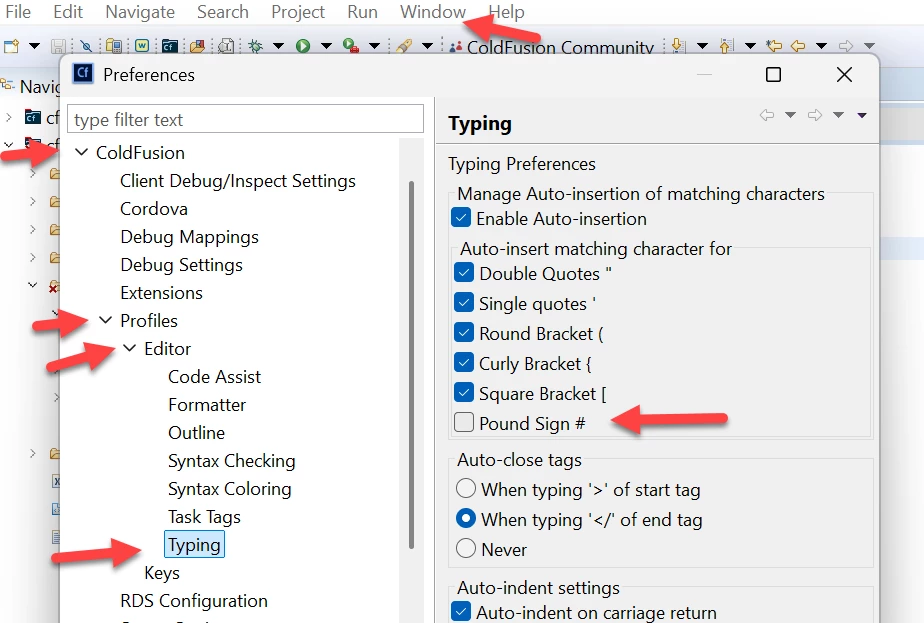
@judo1, now that you've clarified that you mean the old CF Builder on Eclipse (retired in 2024, last updated for CF2018), the steps to do what you want are under the Preferences menu (which on the Windows version is under the "Window" menu), as:
Preferences>ColdFusion>Profiles>Editor>TypingYou'll see the first section there is "Typing Preferences" and within that is a subsection "Auto-insert matching character for", with an option for "Pound Sign (#)". Screenshot below.
Uncheck that, then click "Apply and Close". Try typing a # now. It should no longer auto-add another. I've confirmed it works, without need to reload the editor. Let us know if it works for you.
Already have an account? Login
No account yet? Create an account
Enter your E-mail address. We'll send you an e-mail with instructions to reset your password.


 AdChoices