judo1
Participating Frequently
November 11, 2025
해결됨

Double # [ "

  • November 11, 2025
  • 2 답변들
  • 159 조회

Typing # gives ## - fine for writing code but not for editing. How do I turn it off.

 

최고의 답변: Charlie Arehart

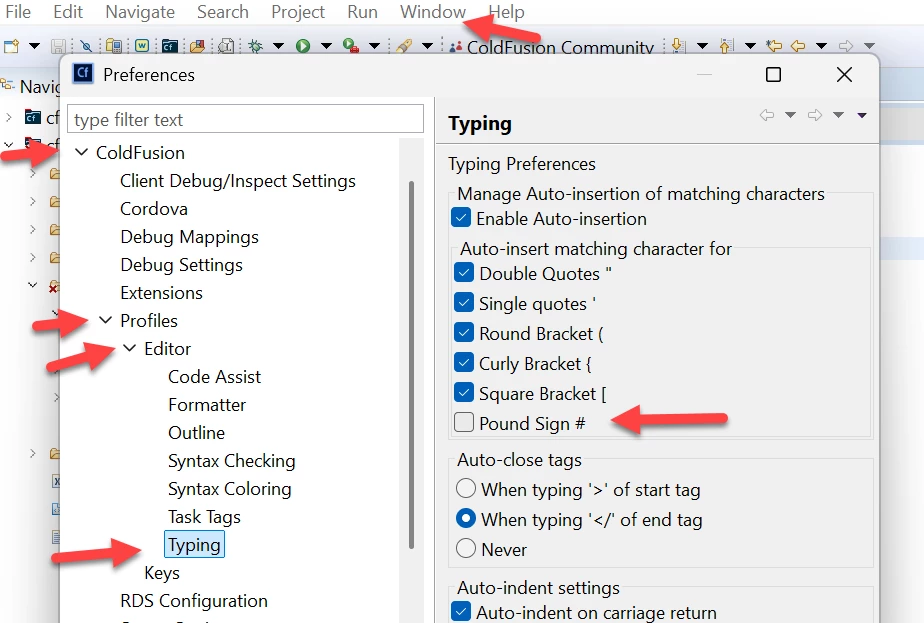
@judo1, now that you've clarified that you mean the old CF Builder on Eclipse (retired in 2024, last updated for CF2018), the steps to do what you want are under the Preferences menu (which on the Windows version is under the "Window" menu), as:

Preferences>ColdFusion>Profiles>Editor>Typing

You'll see the first section there is "Typing Preferences" and within that is a subsection "Auto-insert matching character for", with an option for "Pound Sign (#)". Screenshot below.


Uncheck that, then click "Apply and Close". Try typing a # now. It should no longer auto-add another. I've confirmed it works, without need to reload the editor.  Let us know if it works for you.


2 답변

Charlie Arehart
Community Expert
Community Expert
November 17, 2025

@judo1, now that you've clarified that you mean the old CF Builder on Eclipse (retired in 2024, last updated for CF2018), the steps to do what you want are under the Preferences menu (which on the Windows version is under the "Window" menu), as:

Preferences>ColdFusion>Profiles>Editor>Typing

You'll see the first section there is "Typing Preferences" and within that is a subsection "Auto-insert matching character for", with an option for "Pound Sign (#)". Screenshot below.


Uncheck that, then click "Apply and Close". Try typing a # now. It should no longer auto-add another. I've confirmed it works, without need to reload the editor.  Let us know if it works for you.


/Charlie (troubleshooter, carehart. org)
judo1
judo1작성자
Participating Frequently
November 17, 2025

Thanks, Charlie and BKBK. I had got as far as the Cold Fusion tab in Preferences but I did not dig deep enough.

BKBK
Community Expert
Community Expert
November 11, 2025

What software is this about: CF Builder on Visual Studio Code?

Or Adobe ColdFusion Builder 2018?

judo1
judo1작성자
Participating Frequently
November 15, 2025

CF Builder 


judo1
judo1작성자
Participating Frequently
November 17, 2025

I assume you mean CF Builder on Visual Studio Code. I shall also assume you're on Windows.


You can switch off #-auto-pairing in Visual Studio Code, either for the editor, in general, or just for your particular workspace (which I recommend). You can do so by enabling the auto-pairings you need, but excluding #-auto-pairing. 


The steps are:

  1.  In Visual Studio Code, press the keys CTRL + SHIFT + P to open the Command Palette.
  2.  Scroll down the list and select the option "Preferences: Open Workspace Settings (JSON)".
    The current workspace settings (the default) should be something like:
    {"folders":[],"settings":{}}
  3.  Replace that JSON with:
    {
        "folders": [],
        "settings": {
            "[AdobeCFML]": {
                "editor.autoClosingPairs": [
                    { "open": "\"", "close": "\"" },
                    { "open": "'", "close": "'" },
                    { "open": "(", "close": ")" },
                    { "open": "[", "close": "]" },
                    { "open": "{", "close": "}" },
                    {
                        "open": "<",
                        "close": ">",
                        "notIn": ["string"]
                    }
                ]
            }
        }
    }

    You will have noticed that # is not among the settings. That is the essence of the solution.

  4.  Press the keys CTRL + S to save the settings.
  5.  Test by stopping and restarting Visual Studio Code, opening a CFM or CFC file in your workspace, and typing code that contains #.


Sadly, no. I only became aware of Visual Studio in the last week or so. I am using CF Builder 2018. The problem arose because my ISP upgraded to a new CF which does not support MS Access. As a temporary measure I am adjusting my CF code to accept text generated in Access to at least provide static pages. My ISP converted my tables so my next step is to add them to the Access databases already in CF Administrator. This is creating a whole new range of difficulty mostly due to terminology with which I have never previously encountered. 

J