
Question
Adobe Connect Sharing Issue
PLEASE NOTE:
My issue is with the paid Adobe Connect (8) not the free version
Issue: Windows 2003 Server x64
Unable to share screen
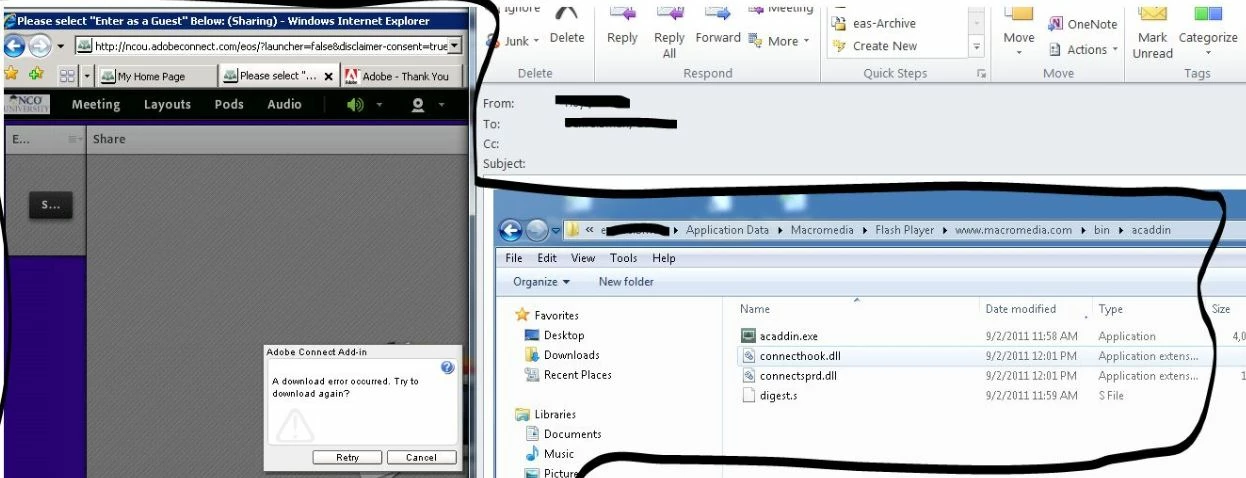
It may be hard to read, but I took the following steps to no avail.
- Downloaded http://www.adobe.com/cfusion/exchange/index.cfm?event=extensionDetail&%20loc=en_us&extid=1802025
- delete the ‘acaddin’ folder
- acaddin.exe (along with 3 other files) now be in the following folder: “C:\Documents and
Settings\ [your name]\Application Data\Macromedia\Flash Player\www.macromedia.com\bin\acaddin\” - Restart your browser, clear your cache & launch your meeting.
Screen shot shows the files in my profile and the error I still get (tries to download).
I remain in the administrators group (although I dont think i need to be once the files are installed).
Any Ideas?


 AdChoices