
November 26, 2013
Answered

Adobe Event with Password Registration

  • November 26, 2013
  • 1 reply
  • 1630 views

I have a customer asking this question for Event Module in Adobe.  Is this possible, if yes?  How do we do this?

He wants to use direct event with unique passcode feature where he sends in a excel sheet with the passcode for each user.

He runs webinars on a subscription  basis and thus the unique passcode he provides to grant each participant access is very important.

Thank you!

Katou
This topic has been closed for replies.
Correct answer brettNZ

I know this does not answer Katou's customer's original question on a unique passcoade for each attendee. I'll leave that for the support team here at Adobe.

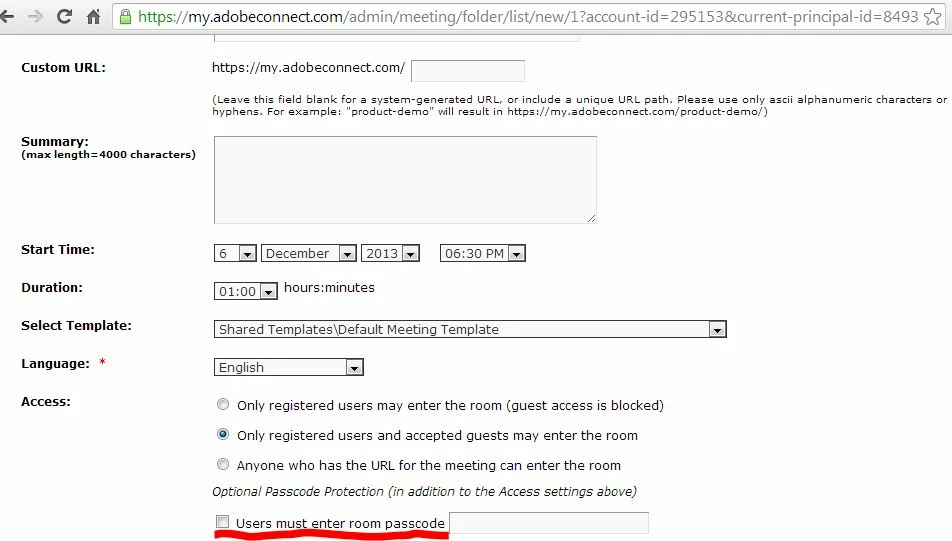
Regarding the 4 options for entry @I-don't-believe-it, when you start your room do you have the same as the below view?

The last option allows you to set a single passcode that must be used by anyone who wants to enter in addition to which of the 3 options above you selected.

brett - Adobe Talent Development

1 reply

Known Participant
December 6, 2013

I have the same question and I think the answer is no, which is a show-stopper if it is.

The Help file states that there are three options for controlling access but then lists four:

"Access

There are three options:

  1. Only registered users may enter the room (guest access is blocked)
    This option allows registered users and participants to enter the room with their user name and password. Guest access is denied.
  2. Only registered users and accepted guests may enter the room
    With this option, the meeting room is accessible only to people invited as registered users and guests. Registered users must enter their user name and password to enter the meeting room. Accepted guests are accepted into the room by the host. Adobe Connect can generate an individual attendance report for each registered user in themeeting. Accepted guests are added to the total number of meeting attendees on meeting reports, but no individual attendance report is available.
    Note: For some Adobe Connect accounts, a host must be present in a meeting in order for attendees to enter.
  3. Users must enter room passcode
    Specify an alphanumeric code if you want to increase meeting security.
  4. Anyone who has the URL for the meeting can enter the room
    Anyone who receives the meeting URL. Click Send E-mail Invitations to create an email invitation in your own email application. The new message contains a pre- populated subject (Adobe Connect Invitation) and a pre-populated message (containing the meeting date, time, duration, location, and summary) that you can edit."

However when I set up a room there is no option 3.

I hope Adobe support will clarity this.

brettNZ
brettNZCorrect answer
Participant
December 6, 2013

I know this does not answer Katou's customer's original question on a unique passcoade for each attendee. I'll leave that for the support team here at Adobe.

Regarding the 4 options for entry @I-don't-believe-it, when you start your room do you have the same as the below view?

The last option allows you to set a single passcode that must be used by anyone who wants to enter in addition to which of the 3 options above you selected.

brett - Adobe Talent Development

Jorma_at_Knox
Legend
December 6, 2013

And to add to Brett's answer, an admin must turn this option on by going to Administration > Users and Groups > Edit Login and Password Policies > Room Passcode. Otherwise it will not be seen as an option in the meeting wizard or edit info for the meeting.