
September 3, 2020
Question

Block "Update Application" popup - Connect 11

  • September 3, 2020
  • 1 reply
  • 3417 views

I am attempting to block the "update Application" popup (attached) when opening Adobe Connect MSI (currently running 2020.07.16.64).
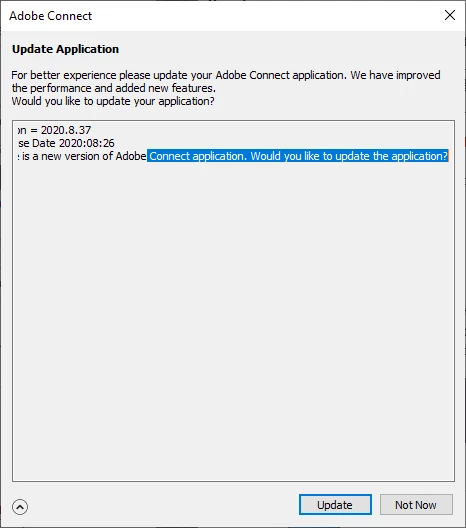


I am doing this in an enterprise environment.


Is there a Regkey that controls this functionality or a switch that can be used when deploying the MSI via SCCM.

    This topic has been closed for replies.

    1 reply

    Participating Frequently
    September 28, 2020

    Im wondering this to!

    Participating Frequently
    September 28, 2020

    Found this!

    https://helpx.adobe.com/adobe-connect/installconfigure/install-application-for-desktop.html

    How to: Disable automatic check for updates

    By default,  Adobe Connect application is set to automatically download and install any updates that are released by Adobe. This section contains instructions for turning off or disabling the automatic check for updates in two ways.

    DISABLE WITHIN THE REGISTRY

    You can set a registry entry that will disable updates. To apply via the registry do the following:

    • Open Start.
    • Search for “Regedit”.
    • Navigate to the following path: HKEY_LOCAL_MACHINE\SOFTWARE\Adobe\Connect
    • Add a registry entry called "preventUpdateCheck" DWORD with non-zero value.
    • Close "Regedit".

    Note:

    To change the default settings, changes must be made under HKEY_LOCAL_MACHINE to allow only Administrators to enforce this option.


    USE THE APPDATA FOLDER
    • Add a file named “restrictedUpdates.txt” to %appdata%\Adobe\Connect\ folder.