Participant
February 14, 2019
Answered

can't add participants

  • February 14, 2019
  • 1 reply
  • 664 views

the add participant button is disabled and I can't figure out how to get it to work. I've read and reread the help file and I know I'm doing it the right way.  Is there another way to add participants?  I don't think so but I'm open to ideas.

This topic has been closed for replies.
Correct answer Jorma_at_Knox

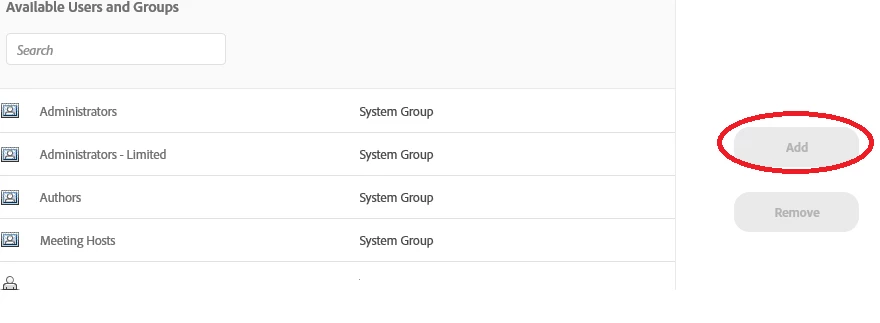
The screen shot you have is how you add existing users from your account to the pre-defined list of users for your room. This option allows you to have people to be able to join the room without you having to accept them or promote them when they join, if they use their user name and password.

Creating users in Connect is an Administrator function and is done by going to Administration > Users and Groups.

If you want someone to join your room, just share the link. When they go to that link they can enter their name in the Guest field and they will be able to join your room. No need to pre-define a list of users, unless you want to with the above options.

1 reply

Jorma_at_Knox
Jorma_at_KnoxCorrect answer
Legend
February 14, 2019

The screen shot you have is how you add existing users from your account to the pre-defined list of users for your room. This option allows you to have people to be able to join the room without you having to accept them or promote them when they join, if they use their user name and password.

Creating users in Connect is an Administrator function and is done by going to Administration > Users and Groups.

If you want someone to join your room, just share the link. When they go to that link they can enter their name in the Guest field and they will be able to join your room. No need to pre-define a list of users, unless you want to with the above options.

Participant
February 14, 2019

thanks so much!