
Inspiring
February 7, 2014
Answered

Can you have more than one Language UI in one Connect deployment?

  • February 7, 2014
  • 1 reply
  • 618 views

Can you have more than one language user interface in one Connect Deployment? For example, we would like to have English be our base UI, but for the Japanese users have Japanese be the UI. We do not want to create a separate instance for each language needed. Is this possible or has anyone found a way to do this?
This topic has been closed for replies.
Correct answer Jorma_at_Knox

1. All supported languages are installed when you install the server.

2. When a user selects a language, that language file will be referenced for all Connect related text. However Meeting rooms and individual content objects will display in the language they were created with.

3. Yes, if you really want to go digging for what text displays in each language, you can go to {install directory}\appserv\apps\lang\ and there will be an xml file for each language on the server.

4. No, all supported languages come with the server.

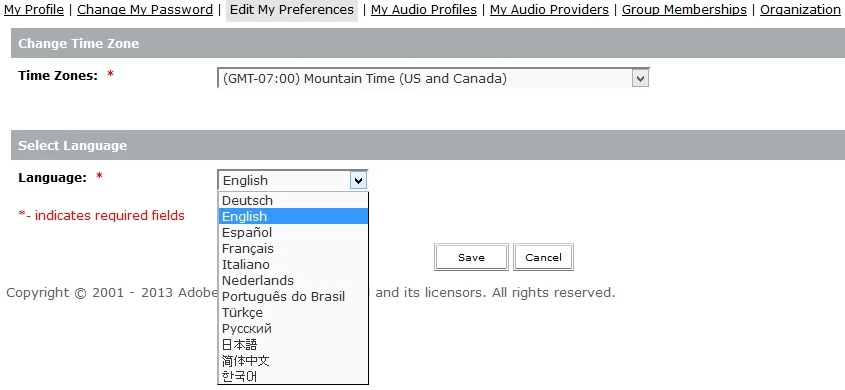
Screen shot of setting user specific language:

1 reply

Jorma_at_Knox
Legend
February 7, 2014

Under the My Profile, you can change your individual language to any of the supported languages. However, new users are defaulted to the language defined on the server.

So, you can create their account, then log in as them and change their language or direct them on how to change their language.

NWNITT49Author
Inspiring
February 7, 2014

Thanks Jorma!

So to restate and confirm:

1. Can you can have English, Japanese, and Chinese installed as supported languages in one on-premise deployment?

2. When a user selects their language, will they see all screens in their selected language?

3. Are the screens already translated for each language?

4. Is each additional language an additional cost?

Jorma_at_Knox
Jorma_at_KnoxCorrect answer
Legend
February 7, 2014

1. All supported languages are installed when you install the server.

2. When a user selects a language, that language file will be referenced for all Connect related text. However Meeting rooms and individual content objects will display in the language they were created with.

3. Yes, if you really want to go digging for what text displays in each language, you can go to {install directory}\appserv\apps\lang\ and there will be an xml file for each language on the server.

4. No, all supported languages come with the server.

Screen shot of setting user specific language: