
Participant
April 2, 2011
Question

Computer slow down problems running AC w/Snow Leopard

  • April 2, 2011
  • 1 reply
  • 3912 views

Hi,

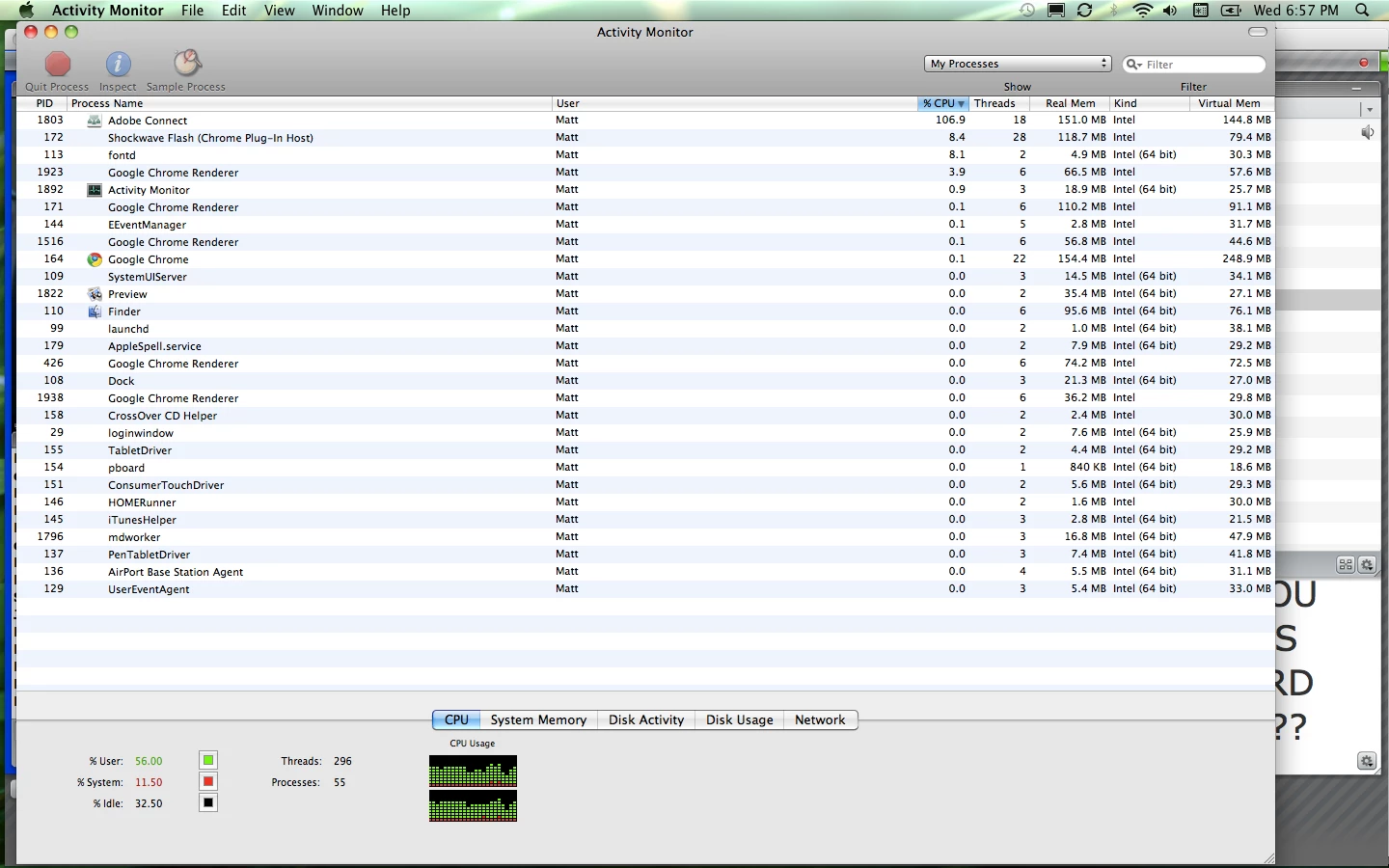
I have a macbook pro running Adobe Connect 8 with Snow Leopard 10.6.7.  Ever since I installed snow leopard I am having major slow down problems in connect.  I am an educator using Adobe Connect to broadcast my video and teach students.  I looked at the activity monitor of my Mac while running a class in AC and the percentage of computer usage was jumping between 80 and 100% for Adobe Connect...that can't be right, right?

Anyone have any ideas to help?  Internet speed is all good but the program keeps pausing and giving me the apple wait symbol while using AC.

Thank you in advance.

Matt
    This topic has been closed for replies.

    1 reply

    April 2, 2011

    Hello. The Adobe Connect technical sales team all use Mac's and Snow Leopard so we're using it daily with Adobe Connect.  We've not seen this at all so I suspect a corrupted Add-in file.

    I suspect you need to remove the Adobe Connect Add-in which would be the issue or the Flash Player install has become corrupted. Drag it to the Trash and empty. Next, I would recommend you uninstall Adobe Flash Player and download the newest 10.2.  You can even try the 10.3 beta which actually has an operating system control panel. All versions work with Adobe Connect just fine. After you have updated Flash I would clear your browser cache and reboot.  Next install the newest Adobe Connect Add-in which was recently updated to address the Mac Add-in.  Here are the links you will need:

    1. Adobe Flash Player 10.2:  http://get.adobe.com/flashplayer/otherversions/

    2. Adobe Flash Player 10.3 Beta:  http://labs.adobe.com/technologies/flashplatformruntimes/flashplayer10-3/

    3. Adobe Connect Add-In: http://timelincoln.appspot.com/www.adobe.com/special/adobeconnect/migration/index.html

    Try that and see if that solves it.  If not then there is something else getting in the way so I would suggest a call to Adobe Support so they can look at the log files to see what the issue is.

    Another option to help diagnose is to attend an Adobe Connect session while using a different browser such as Google's or Firefox. If you see no difference then it is probably the add-in needing replacement. If you see a difference in Google's then it might be your Flash instance because Google has it's own built-in version of Adobe Flash.

    Hope that helps.

    April 5, 2011

    Not sure if this is the best place for this but why not ;-)

    Being an Adobe Connect user in a large company on a Mac, here are some suggestions for Adobe for improving Adobe Connect.

    1. Connect should not require root or administrative permissions to install the plugin.

    2. Connect should not be a 'plugin' let alone be installed to they very inappropriate location of ~/Library/Preferences/Macromedia/Flash Player/www.macromedia.com/bin/connectaddin.  How is this remotely sensible to design it like this?  Preferences is for preferences, not application, plugins or other random object Adobe feels the need to store in there...

    3. Connect should be 64bit. 

    4. Connect should not consume 100% of my CPU (even if its blamed its doing it because the addon becomes corrupt...)

    5. Connect should not hang randomly and force me to Force Quit it after several hours of use.

    Here's how Adobe Connect should work:

    1. I download it via the Mac App Store as a free app.

    2. I click an Adobe Connect session and the App, residing in my /Applications folder as a nice, neat 64-bit Intel App, launches and connects seamlessly.  It does not check or rely on Flash to be installed.  It does not require installation.  It is not an alias to an app in some cryptic, totally improper file system location.  It properly stores my credentials for initiating my Host sessions for an Adobe Connect session.  It support SSO for enterprise users.

    Thanks...

    April 5, 2011

    thxdude, Thank you for your excellent suggestions and I do have some good news on some of them.

    1. Because we are installing a program we need to adhere to the permissions that are set on the PC/Mac. I'll check if there are any other options on that.

    2. The Connect Add-in provides specific functions that Adobe Flash does not provide natively. Ultimately, your idea is great and we agree.  It's a matter of convincing the Adobe Flash development team to add those functions to the native Flash code. It's always under discussion. As functions in the Flash player change they do reduce the size and need for the add-in. The Add-in is needed for the FIle Share pod, Screen Sharing, and Enhanced Audio as well as enhanced rights for attendees. If you do not use those functions, then the add-in is not needed. You can always run without the add-in by adding the command to the end of your URL with the ?launcher=false command. So, for example, http://yourcompany.adobeconnect.com/roomname?launcher=false

    3. Because the Adobe Connect Add-in is adding functions to the Adobe Flash Player, it is required to be installed wherever Flash is installed. The add-in is very small and installs in seconds.

    4. Adobe Connect requires Adobe Flash as Flash is the player for all functions.

    5. The Adobe Flash Player 64-bit version is in beta for some time now and can be installed by visiting the Adobe Labs site and try it out:

    http://labs.adobe.com/downloads/flashplayer10_square.html

    Understand, that until Flash 64-bit is released the Adobe Connect development team begins their work on the released code. I would suspect you will see 64-bit Adobe Connect once Flash 64-bit is pretty standard. Stay tuned on that.  It's going to take awhile.

    6. Connect should not be consuming your CPU like that. I've only seen that once and I fixed it by uninstalling the add-in, uninstalling Flash then reinstalling both. Somehow the Flash cache got corrupted.

    7. Connect should not be hanging or crashing. If so, then Adobe Support needs to take a look at your logs. I suggest you report this and go through the process. Perhaps there is some conflict with another program. I had a similar issue recently with MS Outlook 2011 for Mac and we discovered that the anti-virus was not compatible. Microsoft advised that a fix for Outlook is coming soon with a fixpack. So, we need to see what is going on with your PC/Mac.

    8. We need to check for Flash as we require Adobe Flash as our player. We check to see that at least Flash 9 or Flash 10.1 is there and then we check to see what version of the add-in to Flash installed. If older, we upgrade it using the lightning installer

    9. We do save your login (email address from last time) but we ask for your password. We did release the Adobe Connect Desktop Client based on Air which would help you with some of your options for logging in. Check it out and add any suggestions for improvement to the ideas site.

    10. We do support SSO and the instructions are located in the installation guide.

    Here is how you can get the latest Adobe Connect Add-in 8 SP1 which is now the recommended add-in for everyone including previous versions:

    http://www.adobe.com/special/adobeconnect/migration/index.html

    Here is where you can download the new Adobe Connect Desktop Client: http://www.connectusers.com/downloads/

    I love your suggestions. Please post these to http://ideas.adobe.com as they do look there when new versions are developed.

    Thanks again. Always good to get suggestions and ideas.