
Participant
August 8, 2013
Answered

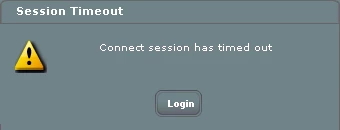
Connect session has timed out error

  • August 8, 2013
  • 4 replies
  • 7496 views

I recently installed Presenter 9 and have attempted to publish a presentation to our Adobe Connect Pro site. The permissions are set for public viewing, however anytime a user attempts to view the presentation they receive an error message of "Connect session has timed out"..

Clicking the Login button does nothing. (Besides the fact that they should not be required to login anyway.)

I've attempted to publish directly to Adobe Connect from Presenter and I've also attempted uploading it to Connect as a .zip presentation. In either case, the error still occurs.
I'm at a loss on how to get this published and functional. Can anyone assist?

This topic has been closed for replies.
Correct answer sameer_puri

Hi Jason,

Sorry for the trouble you are having.

This is a known issue with P9 and Connect combination and we are working on it to provide a fix for this one soon. Till we do that, you have a couple of workarounds to avoid hitting this issue:

1.    Upload a PPTX file directly in the share pod/Content library rather than publishing it using P9. This shall work for most of the cases unless there are audio/video assets in that PPTX which will be dropped in direct upload scenarios.

2.    If they have assets which are required for the presentation, the only workaround is to use Presenter 8.x (or previous versions) to publish rather than P9 till we give a Connect patch to fix this one.

Hope this helps!

Sameer Puri

4 replies

Participant
January 23, 2015

I am also getting this error - using Presenter 10 onto Connect 9.3.  My colleague has Presenter 9 and has this issue too.

I need to save using Presenter and can not upload directly. Also, I am unable to use Presenter 8.

Can someone from Adobe please advise.

Participant
May 29, 2014

Having same issue - we saved a template and when we reused the content (PPTX) saved in the Share Pod of that template we get this session timed out error.

Rick in Wyo
Participant
September 11, 2013

If you create in Presenter 9 then open the same project in Presenter 8 you will continue to have a problem.  The fix involves editing an XML file.  See the thread at  http://www.connectusers.com/forums/search/243306432/   I believe you can still download presenter 8 as a trial.

Jorma_at_Knox
Legend
September 11, 2013

reckhardt,

The link you gave doesn't work. Can you post a link to the thread instead of the search results?

Also, I don't believe you can download Presenter 8 any longer.

sameer_puri
Adobe Employee
Adobe Employee
September 11, 2013

Correct link where this is discussed in detail is: http://www.connectusers.com/forums/topic/8939/timeout/

Thanks

Sameer Puri

sameer_puri
Adobe Employee
sameer_puriCorrect answer
Adobe Employee
August 8, 2013

Hi Jason,

Sorry for the trouble you are having.

This is a known issue with P9 and Connect combination and we are working on it to provide a fix for this one soon. Till we do that, you have a couple of workarounds to avoid hitting this issue:

1.    Upload a PPTX file directly in the share pod/Content library rather than publishing it using P9. This shall work for most of the cases unless there are audio/video assets in that PPTX which will be dropped in direct upload scenarios.

2.    If they have assets which are required for the presentation, the only workaround is to use Presenter 8.x (or previous versions) to publish rather than P9 till we give a Connect patch to fix this one.

Hope this helps!

Sameer Puri

Participant
August 8, 2013

Thanks Sameer for the quick reply.

The presentation does contain audio assets and I don't have the prior version of Presenter at the moment. I'm up against a deadline, so I'm going to attempt to port it over to Captivate 7 and see what I can do from there.

By chance, are there any known Captivate 7 publishing issues on Adobe Connect before I go down that path?

Thank you again!

Jason

sameer_puri
Adobe Employee
Adobe Employee
August 8, 2013

Hi jason,

You should not encounter any similar issues with Captivate 7. If by any chance, you have ANY issues with Captivate, do let us know. We can then then work together to solve your problem in another way.

Thanks

Sameer Puri