
October 1, 2009
Question

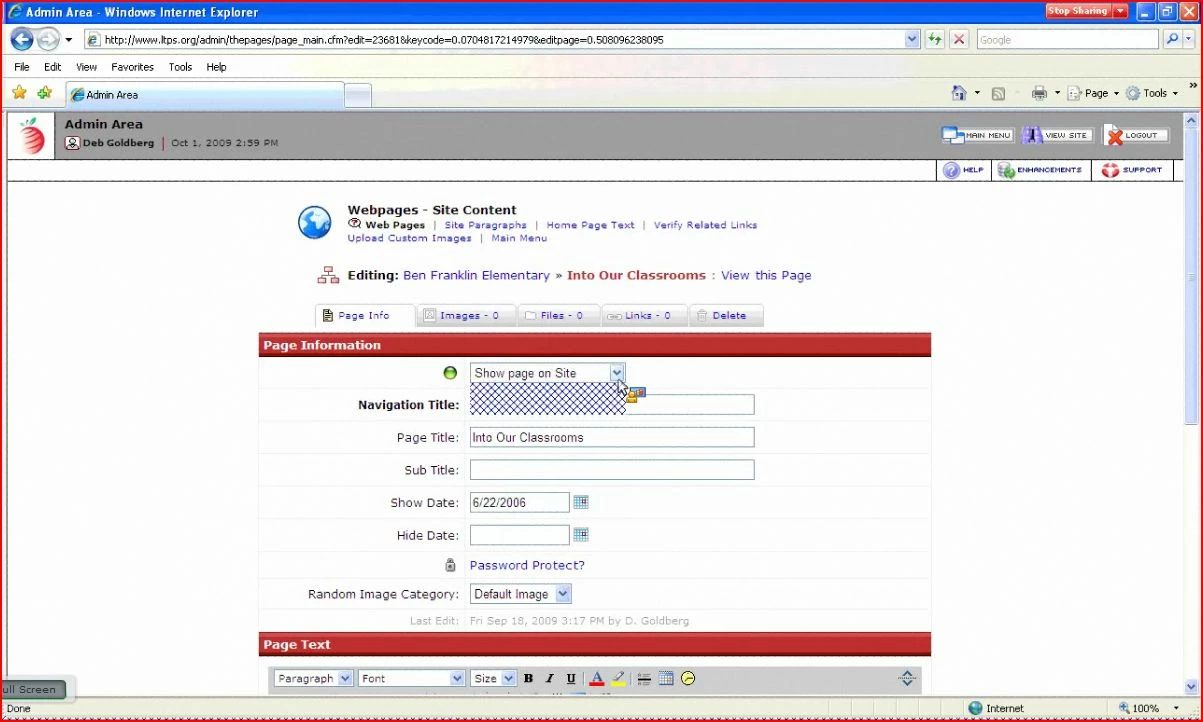
drop down menu blank

  • October 1, 2009
  • 1 reply
  • 790 views

I have set up a meeting and my drop down menus are showing up with some weird thatch like pattern instead of the content that is supposed to be there. Here is a screenshot. On the presenters machine it looks correct but all meeting guests it looks like the screenshot. Ideas?
    This topic has been closed for replies.

    1 reply

    October 5, 2009

    I called technical support and my issue has been resolved.

    When sharing your screens with meeting guests you need to share the entire application or the entire desktop for guests to see what is in the drop downs. Sharing the window by itself will not allow the meeting guests to see drop down menus. Adobe Connect doesn’t consider the drop down part of the original window that you’ve shared. I would suggest sharing the application which in this case would be whatever flavor web browser you’re using (Internet Explorer, Firefox, Safari) and not the entire desktop in case you need to do anything “behind the scenes” and don’t want guests seeing what you’re doing.