
michaelm19617145
Known Participant
July 24, 2018
Question

Event Registration Questions

  • July 24, 2018
  • 1 reply
  • 359 views

We set up an Event using the default registration questions (i.e., first & last name, email address, password, re-type password). When I go into Reports to see the responses it does not seem to be capturing the email address that the invitees are entering. I can see the First Name, Last Name, and the username they created but I cannot find their email addresses. Is it possible to get this information? Thanks.

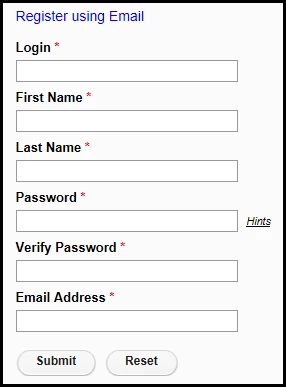
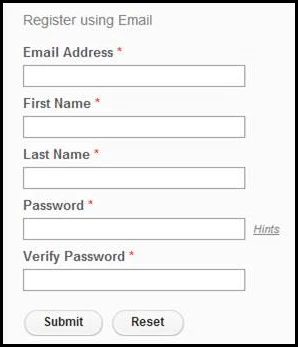
Also, I noticed that our Registration page looks like the one on the left, even though "Login" is not an available option when selecting your registration questions. The image on the right is from the Adobe guides. The one on the right is what we want (no Login field), where you are registering using your email address without having to create a separate Login.
    This topic has been closed for replies.

    1 reply

    Jorma_at_Knox
    Legend
    July 24, 2018

    Starting with the registration field.

    You see a different registration page with a Login and Email Address because your account is set to not default to emails as the login. This seems to be a change the may have come in one of the more recent patches, as I don't recall that setting affecting Events before. If the account is changed to default to the Email Address as the user login ID, then it changes this field to the image on the right. This setting can be found at Administration > Users and Groups > Edit Login and Password Policies. It is the first option under Login Policy.

    Events Reports

    For the reports not showing emails, what report are you looking at? If I click on the Number Registered or Number Attended report on the Summary Reports page I see a list of names and emails. Also, if I select to Download Report Data from the User Information Report on the same page, I get a CSV file with the information from the registrants. The Login field should be their email unless they used the Login option from the above explanation. When looking at the Registration reports page, i see the Email address field in the graph, but it only indicates the number of registrations that provided an email, not the specific emails. By Answers doesn't show the responses to the default 4 questions, but will show any additional responses desired for the registration.

    Hope that helps clarify what is happening and why.